
User Manual

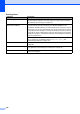


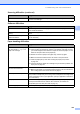


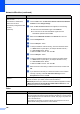


Table Of Contents
- USER’S GUIDE MFC-9120CN MFC-9320CW
- Approval Information and Compilation and Publication Notice
- Table of Contents
- Section I: General
- Section II: Fax
- Sending a fax
- How to fax
- Broadcasting (black & white only)
- Additional sending operations
- Sending faxes using multiple settings
- Electronic cover page (black & white only)
- Contrast
- Changing Fax Resolution
- Dual access (black & white only)
- Real Time Transmission
- Overseas Mode
- Delayed Fax (black & white only)
- Delayed batch transmission (black & white only)
- Checking and cancelling waiting jobs
- Sending a fax manually
- Out of memory message
- Receiving a fax
- Telephone and external devices
- Dialling and storing numbers
- Remote Fax Options (black & white only)
- Polling
- Printing reports
- Sending a fax
- Section III: Copy
- Section IV: Direct printing
- Section V: Software
- Section VI: Appendixes
- Index
- brother CHN_ENG

122
Sending faxes
Difficulties Suggestions
Poor sending quality. Try changing your resolution to Fine or S.Fine. Make a copy to check your
machine’s scanner operation. If the copy quality is not good, clean the scanner.
(See Cleaning the scanner glass on page 151.)
Transmission Verification Report
says ‘RESULT:ERROR’.
There is probably temporary noise or static on the line. Try sending the fax again.
If you are sending a PC Fax message and get ‘RESULT:ERROR’ on the
Transmission Verification Report, your machine may be out of memory. To free up
extra memory, you can turn off fax storage (see Turning off Remote Fax Options
on page 68), print fax messages in memory (see Printing a fax from the memory
on page 49) or cancel a delayed fax or polling job (see Checking and cancelling
waiting jobs on page 43). If the problem continues, ask the telephone company to
check your telephone line.
If you often get transmission errors due to possible interference on the telephone
line, try changing the Compatibility setting to Basic(for VoIP). (See
Telephone line interference on page 136.)
Sent faxes are blank. Make sure you are loading the document properly. (See Loading documents
on page 22)
Vertical black lines when sending. Black vertical lines on faxes you send are typically caused by dirt or correction fluid
on the glass strip. (See Cleaning the scanner glass on page 151.)
Cannot send a fax. (For MFC-9320CW only) Contact your administrator to check your Secure
Function Lock Settings.