
User Manual


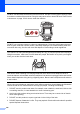


Table Of Contents
- USER’S GUIDE MFC-9120CN MFC-9320CW
- Approval Information and Compilation and Publication Notice
- Table of Contents
- Section I: General
- Section II: Fax
- Sending a fax
- How to fax
- Broadcasting (black & white only)
- Additional sending operations
- Sending faxes using multiple settings
- Electronic cover page (black & white only)
- Contrast
- Changing Fax Resolution
- Dual access (black & white only)
- Real Time Transmission
- Overseas Mode
- Delayed Fax (black & white only)
- Delayed batch transmission (black & white only)
- Checking and cancelling waiting jobs
- Sending a fax manually
- Out of memory message
- Receiving a fax
- Telephone and external devices
- Dialling and storing numbers
- Remote Fax Options (black & white only)
- Polling
- Printing reports
- Sending a fax
- Section III: Copy
- Section IV: Direct printing
- Section V: Software
- Section VI: Appendixes
- Index
- brother CHN_ENG

Safety and legal
109
A
5 We DO NOT advise using an extension lead.
6 Never install telephone wiring during a lightning storm. Never install a telephone wall socket
in a wet location.
7 If any cables become damaged, disconnect your machine, and contact your Brother dealer.
8 DO NOT place any objects on the machine, or obstruct the air vents.
9 This product should be connected to an adjacent grounded AC power source within the
range indicated on the rating label. DO NOT connect it to a DC power source or inverter. If
you are not sure, contact a qualified electrician.
SAVE THESE INSTRUCTIONS
CAUTION
After you have just used the machine, some internal parts of the machine will be extremely hot.
To prevent injury, when you open the top or back cover (back output tray) of the machine, DO
NOT touch the shaded parts shown in the illustration.
To prevent injuries, be careful not to put your hands on the edge of the machine under the
document cover, the scanner, or the top cover as shown in the illustrations.