
User Manual

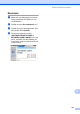



Table Of Contents
- USER’S GUIDE MFC-9120CN MFC-9320CW
- Approval Information and Compilation and Publication Notice
- Table of Contents
- Section I: General
- Section II: Fax
- Sending a fax
- How to fax
- Broadcasting (black & white only)
- Additional sending operations
- Sending faxes using multiple settings
- Electronic cover page (black & white only)
- Contrast
- Changing Fax Resolution
- Dual access (black & white only)
- Real Time Transmission
- Overseas Mode
- Delayed Fax (black & white only)
- Delayed batch transmission (black & white only)
- Checking and cancelling waiting jobs
- Sending a fax manually
- Out of memory message
- Receiving a fax
- Telephone and external devices
- Dialling and storing numbers
- Remote Fax Options (black & white only)
- Polling
- Printing reports
- Sending a fax
- Section III: Copy
- Section IV: Direct printing
- Section V: Software
- Section VI: Appendixes
- Index
- brother CHN_ENG

102
15
The User’s Guide on the CD-ROM includes
the Software User’s Guide and Network
User’s Guide for features available when
connected to a computer (for example,
printing and scanning). These guides have
easy to use links that, when clicked, will take
you directly to a particular section.
You can find information on these features:
Printing
Scanning
ControlCenter3 (Windows
®
)
ControlCenter2 (Macintosh)
Remote Setup
Faxing from your computer
Network Faxing
Network Printing
Network Scanning
Wireless Network Users
(MFC-9320CW only)
Note
See Accessing the Software User’s Guide
and Network User’s Guide on page 3.
How to read the HTML
User’s Guide 15
This is a quick reference for using the HTML
User’s Guide.
Windows
®
15
Note
If you have not installed the software, see
Viewing documentation (Windows
®
)
on page 3.
a From the Start menu, point to Brother,
MFC-XXXX from the programs group,
then click User’s Guides in HTML
format.
b Click on the manual you want
(SOFTWARE USER’S GUIDE or
NETWORK USER’S GUIDE) from the
Top Menu.
c Click the heading you would like to view
from the list at the left of the window.
Software and Network features 15