
Quick Setup Guide
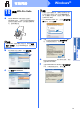
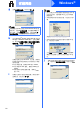
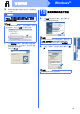
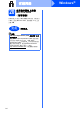
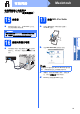

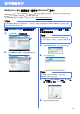
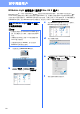
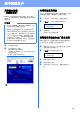
Table Of Contents

21
Windows
®
有线网络
Windows
®
Macintosh
有线网络
18
安装
MFL-Pro Suite
a 将标有
Windows
字样的随机光盘插入
CD-ROM
光驱中。出现型号名称选择屏幕时,
选择您的设备型号名称;出现语言选择屏幕
时,选择所需语言。
b 将出现随机光盘主菜单。点击初始安装。
c 点击安装
MFL-Pro Suite
。
d 出现
Presto! PageManager
许可证协议窗口
时,如果您接受该协议,请点击是。
e
Presto! PageManager
将自动开始安装,然后
安装
MFL-Pro Suite
。
f 出现
Brother MFL-Pro Suite
软件许可证协议窗
口时,如果您接受该协议,请点击是。
注释
如果
Brother
安装屏幕未自动出现,请转到我的
电脑
(
计算机
)
,双击
CD-ROM
图标,然后双击
Start.exe
。
注释
• 如果无法自动继续安装,请弹出然后再插入随
机光盘或双击根目录文件夹中的
Start.exe
程
序,以重新打开主菜单,然后从步骤 c 继续安
装
MFL-Pro Suite
。
• 对于
Windows Vista
®
用户,当出现用户帐户控
制屏幕时,请点击允许。