
Multifunction Printer User's Guide



210
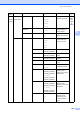
7.Network
(MFC-9320CW)
(Continued)
2.WLAN
(Continued)
1.TCP/IP
(Continued)
0.IPv6 On
Off*
Enable or Disable the
IPv6 protocol. If you
want to use the IPv6
protocol, visit
http://solutions.
brother.com/ for
more information.
See
Network
User
’
s
Guide on
the
CD
-
ROM.
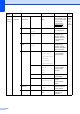
2.Setup Wizard
1.On
2.Off
— You can configure
your print server.
3.SES/WPS/AOSS
1.On
2.Off
— You can easily
configure your
wireless network
settings using the
one-button push
method.
4.WPS w/PIN
Code
1.On
2.Off
— You can easily
configure your
wireless network
settings using WPS
with a PIN code.
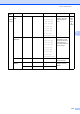
5.WLAN Status
1.Status Active(11b)
Active(11g)
Wired LAN Active
WLAN OFF
AOSS Active
Connection Fail
You can see the
current wireless
network status.
2.Signal Strong
Medium
Weak
None
You can see the
current wireless
network signal
strength.
3.SSID — You can see the
current SSID.
4.Comm. Mode Ad-hoc
Infrastructure
You can see the
current
Communication
Mode.
6.Set to
Default
— 1.Reset
2.Exit
Restore the wireless
network settings to
factory default.
7.WLAN Enable
— On
Off*
Enable or disable the
wireless LAN
manually.
Main
Menu
Submenu Menu Selections Options Descriptions Page