
Multifunction Printer User's Guide

198
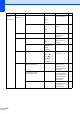
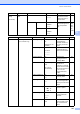
2.Fax
(Continued)
2.Setup Send
(In Fax mode only)
1.Contrast Auto*
Light
Dark
Changes the lightness
or darkness of faxes
you send.
42
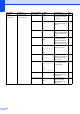
2.Fax Resolution
Standard*
Fine
S.Fine
Photo
Sets the default
resolution for outgoing
faxes.
42
3.Delayed Fax — Sets the time of day in
24 hour format that the
delayed faxes will be
sent.
44
4.Batch TX On
Off*
Combines delayed
faxes going to the
same fax number at
the same time of day
into one transmission.
44
5.Real Time TX
Next Fax:On
Next Fax:Off
On
Off*
Sends a fax without
using the memory.
43
6.Polled TX Standard*
Secure
Sets up your machine
with a document to be
retrieved by another
fax machine.
80
7.Coverpg Setup
Next Fax:On
Next Fax:Off
On
Off*
Print Sample
Automatically sends a
cover page you have
programmed.
41
8.Coverpage Note
— Sets up your own
comments for the fax
cover page.
41
9.Overseas Mode
On
Off*
If you are having
difficulty sending
faxes overseas, set
this to On.
44
Main Menu Submenu Menu Selections Options Descriptions Page