
User Manual
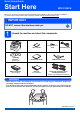
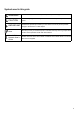
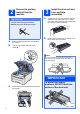

Table Of Contents
- Quick Setup Guide MFC-9120CN
- Start Here
- 1 Unpack the machine and check the components
- 2 Remove the packing material from the machine
- 3 Install the drum unit and toner cartridge assemblies
- 4 Load paper in the paper tray
- 5 Connect the power cord and telephone line
- 6 Choose a Receive Mode
- 7 Choose your language (if needed)
- 8 Set The LCD contrast (if needed)
- 9 Set the date and time
- 10 Enter personal information (station ID)
- 11 Fax Transmission Report
- 12 Set tone or pulse dialling mode
- 13 Dial Prefix
- 14 Choose your connection type
- For USB Interface Users (Windows® 2000 Professional/XP/XP Professional x64 Edition/ Windows Vista®)
- For USB Interface Users (Mac OS X 10.3.9 or greater)
- For Wired Network Interface Users (Windows® 2000 Professional/XP/XP Professional x64 Edition/ Windows Vista®)
- For Wired Network Interface Users (Mac OS X 10.3.9 or greater)
- For Network Users
- Options and Consumables
- brother CHN-ENG
- Start Here

3
Symbols used in this guide
WARNING
WARNINGs tell you what to do to prevent possible personal injury.
CAUTION
CAUTIONs specify procedures you must follow or avoid to prevent possible minor
injuries.
IMPORTANT
IMPORTANT specifies procedures you must follow or avoid to prevent possible
damage to the machine or other objects.
Note
Notes tell you how you should respond to a situation that may arise or give tips about
how the current operation works with other features.
User's Guide
Network User's
Guide
Indicates reference to the User's Guide or Network User's Guide which is on the CD-
ROM we have supplied.