
User Manual


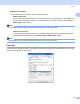
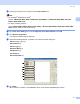
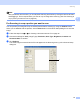
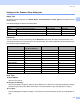

Table Of Contents
- SOFTWARE USER’S GUIDE DCP-9010CN MFC-9120CN MFC-9320CW
- Trademarks
- Table of Contents
- Windows®
- 1 Printing
- Using the Brother printer driver
- Printing a document
- Duplex printing
- Simultaneous scanning, printing and faxing
- Printer operation keys
- Status Monitor
- Printer driver settings
- Features in the Windows® printer driver
- Basic tab
- Advanced tab
- Tray Settings tab
- Support
- Features in the BR-Script (PostScript® 3™ language emulation) printer driver
- 2 Scanning
- 3 ControlCenter3
- 4 Remote Setup (MFC-9120CN and MFC-9320CW only)
- 5 Brother PC-FAX Software (MFC-9120CN and MFC-9320CW only)
- 6 Firewall settings (For Network users)
- 1 Printing
- Apple Macintosh
- 7 Printing and Faxing
- Printer operation key
- Status Monitor
- Features in the printer driver (Macintosh)
- Removing the Printer driver for Macintosh
- Using the BR-Script3 Driver (PostScript® 3™ language emulation printer driver)
- Features in the BR-Script 3 (PostScript® 3™ language emulation) printer driver
- Sending a fax (MFC-9120CN and MFC-9320CW only)
- 8 Scanning
- 9 ControlCenter2
- 10 Remote Setup
- 7 Printing and Faxing
- Using The Scan key
- 11 Scanning (For USB cable users)
- 12 Network Scanning
- Index

Scanning
42
2
Document Size 2
Choose one of the following sizes:
A4 210 x 297 mm (8.3 x 11.7 in)
JIS B5 182 x 257 mm (7.2 x 10.1 in)
Letter 215.9 x 279.4 mm (8 1/2 x 11 in)
Legal 215.9 x 355.6 mm (8 1/2 x 14 in) (It is available with the ADF.)
A5 148 x 210 mm (5.8 x 8.3 in)
Executive 184.1 x 266.7 mm (7 1/4 x 10 1/2 in)
Business Card 90 x 60 mm (3.5 x 2.4 in)
To scan business cards, choose the Business Card size, and then place the business card face down at
the top left of the scanner glass, as indicated by the document guidelines on the machine.
Photo10x15cm(4x6in)
Index Card 127 x 203.2 mm (5 x 8 in)
Photo L 89 x 127 mm (3.5 x 5 in)
Photo2L13x18cm(5x7in)
Postcard1100x148mm(3.9x5.8in)
Postcard 2 (Double) 148 x 200 mm (5.8 x 7.9 in)
Custom
If you choose Custom as the size, the Custom Document Size dialog box appears.
Enter the Name, Width and Height for the document.
You can choose ‘mm’ or ‘inch’ as the unit for Width and Height.