
User Manual

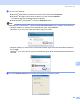
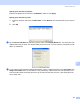

Table Of Contents
- SOFTWARE USER’S GUIDE DCP-9010CN MFC-9120CN MFC-9320CW
- Trademarks
- Table of Contents
- Windows®
- 1 Printing
- Using the Brother printer driver
- Printing a document
- Duplex printing
- Simultaneous scanning, printing and faxing
- Printer operation keys
- Status Monitor
- Printer driver settings
- Features in the Windows® printer driver
- Basic tab
- Advanced tab
- Tray Settings tab
- Support
- Features in the BR-Script (PostScript® 3™ language emulation) printer driver
- 2 Scanning
- 3 ControlCenter3
- 4 Remote Setup (MFC-9120CN and MFC-9320CW only)
- 5 Brother PC-FAX Software (MFC-9120CN and MFC-9320CW only)
- 6 Firewall settings (For Network users)
- 1 Printing
- Apple Macintosh
- 7 Printing and Faxing
- Printer operation key
- Status Monitor
- Features in the printer driver (Macintosh)
- Removing the Printer driver for Macintosh
- Using the BR-Script3 Driver (PostScript® 3™ language emulation printer driver)
- Features in the BR-Script 3 (PostScript® 3™ language emulation) printer driver
- Sending a fax (MFC-9120CN and MFC-9320CW only)
- 8 Scanning
- 9 ControlCenter2
- 10 Remote Setup
- 7 Printing and Faxing
- Using The Scan key
- 11 Scanning (For USB cable users)
- 12 Network Scanning
- Index

Network Scanning
186
12
b Do one of the following:
(Windows
®
2000) Select your Brother machine from the list and click Properties.
(Windows
®
XP) Right-click the Scanner Device icon and choose Properties.
The Network Scanner Properties dialog box appears.
(Windows Vista
®
and Windows
®
7) Click the Properties button.
Note
(Windows Vista
®
and Windows
®
7) When the User Account Control screen appears, do the following.
• (Windows Vista
®
) For users who have administrator rights: Click Continue.
(Windows
®
7) For users who have administrator rights: Click Yes.
• (Windows Vista
®
) For users who do not have administrator rights: Enter the administrator password
and click OK.
(Windows
®
7) For users who do not have administrator rights: Enter the administrator password and
click Yes.
c Click the Network Setting tab and choose the appropriate connection method.