
User Manual


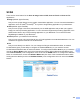


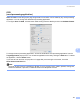
Table Of Contents
- SOFTWARE USER’S GUIDE DCP-9010CN MFC-9120CN MFC-9320CW
- Trademarks
- Table of Contents
- Windows®
- 1 Printing
- Using the Brother printer driver
- Printing a document
- Duplex printing
- Simultaneous scanning, printing and faxing
- Printer operation keys
- Status Monitor
- Printer driver settings
- Features in the Windows® printer driver
- Basic tab
- Advanced tab
- Tray Settings tab
- Support
- Features in the BR-Script (PostScript® 3™ language emulation) printer driver
- 2 Scanning
- 3 ControlCenter3
- 4 Remote Setup (MFC-9120CN and MFC-9320CW only)
- 5 Brother PC-FAX Software (MFC-9120CN and MFC-9320CW only)
- 6 Firewall settings (For Network users)
- 1 Printing
- Apple Macintosh
- 7 Printing and Faxing
- Printer operation key
- Status Monitor
- Features in the printer driver (Macintosh)
- Removing the Printer driver for Macintosh
- Using the BR-Script3 Driver (PostScript® 3™ language emulation printer driver)
- Features in the BR-Script 3 (PostScript® 3™ language emulation) printer driver
- Sending a fax (MFC-9120CN and MFC-9320CW only)
- 8 Scanning
- 9 ControlCenter2
- 10 Remote Setup
- 7 Printing and Faxing
- Using The Scan key
- 11 Scanning (For USB cable users)
- 12 Network Scanning
- Index

ControlCenter2
161
9
OCR
(word processing application) 9
Scan To OCR converts the graphic page image data into text which can be edited by any word processing
application. You can change the default word processing application.
To configure Scan To OCR, click the button while holding down the Ctrl key and choose Software Button.
To change the word processing application, choose the destination word processing application from the
Target Application pop-up menu. You can add an application to the list by clicking the Add button. To delete
an application, click the Delete button.
If you want to scan and then crop a portion of a page after pre-scanning the document, check the
Show Scanner Interface box.
Note
The Scan to OCR function is available for English, French, German, Dutch, Italian, Spanish, Portuguese,
Danish and Swedish, Japanese, Traditional Chinese and Simplified Chinese.