
User Manual

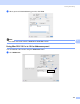
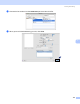

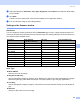
Table Of Contents
- SOFTWARE USER’S GUIDE DCP-9010CN MFC-9120CN MFC-9320CW
- Trademarks
- Table of Contents
- Windows®
- 1 Printing
- Using the Brother printer driver
- Printing a document
- Duplex printing
- Simultaneous scanning, printing and faxing
- Printer operation keys
- Status Monitor
- Printer driver settings
- Features in the Windows® printer driver
- Basic tab
- Advanced tab
- Tray Settings tab
- Support
- Features in the BR-Script (PostScript® 3™ language emulation) printer driver
- 2 Scanning
- 3 ControlCenter3
- 4 Remote Setup (MFC-9120CN and MFC-9320CW only)
- 5 Brother PC-FAX Software (MFC-9120CN and MFC-9320CW only)
- 6 Firewall settings (For Network users)
- 1 Printing
- Apple Macintosh
- 7 Printing and Faxing
- Printer operation key
- Status Monitor
- Features in the printer driver (Macintosh)
- Removing the Printer driver for Macintosh
- Using the BR-Script3 Driver (PostScript® 3™ language emulation printer driver)
- Features in the BR-Script 3 (PostScript® 3™ language emulation) printer driver
- Sending a fax (MFC-9120CN and MFC-9320CW only)
- 8 Scanning
- 9 ControlCenter2
- 10 Remote Setup
- 7 Printing and Faxing
- Using The Scan key
- 11 Scanning (For USB cable users)
- 12 Network Scanning
- Index

150
8
8
Scanning from a Macintosh 8
The Brother machine software includes a TWAIN Scanner driver for Macintosh. You can use this Macintosh
TWAIN Scanner driver with any applications that support TWAIN specifications.
Note
If you want to scan from a machine on a network, choose the networked machine in the Device Selector
application located in Macintosh HD/Library/Printers/Brother/Utilities/DeviceSelector or from the
Model pop-up menu of ControlCenter2.
Run your Macintosh TWAIN-compliant application. The first time you use the Brother TWAIN driver, set it as
the default driver by choosing Select Source. For each document you scan after this, choose
Acquire Image Data or Acquire. The menu option that lets you choose the Scanner driver may vary
depending on your application.
Note
The method of choosing the default driver or scanning a document may vary depending on the application
you are using.
Scanning 8