
User`s guide
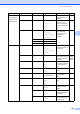

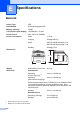

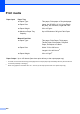
Table Of Contents
- USER’S GUIDE MFC-9120CN MFC-9320CW
- Approval Information and Compilation and Publication Notice
- EC Declaration of Conformity
- Table of Contents
- Section I: General
- 1 General information
- Using the documentation
- Accessing the Software User’s Guide and Network User’s Guide
- Viewing documentation
- Viewing documentation (Windows®)
- How to find scanning instructions
- Software User’s Guide:
- ScanSoft™ PaperPort™ 11SE with OCR How-to-Guides:
- How to find Network setup instructions
- Viewing documentation (Macintosh)
- How to find scanning instructions
- Software User’s Guide:
- Presto! PageManager User’s Guide:
- How to find Network setup instructions
- Viewing documentation
- Accessing Brother Support (For Windows®)
- Control panel overview
- 2 Loading paper and documents
- 3 General Setup
- 4 Security features
- 1 General information
- Section II: Fax
- 5 Sending a fax
- How to fax
- Broadcasting (black & white only)
- Additional sending operations
- Sending faxes using multiple settings
- Electronic cover page (black & white only)
- Contrast
- Changing Fax Resolution
- Dual access (black & white only)
- Real Time Transmission
- Overseas Mode
- Delayed Fax (black & white only)
- Delayed batch transmission (black & white only)
- Checking and cancelling waiting jobs
- Sending a fax manually
- Out of memory message
- 6 Receiving a fax
- 7 Telephone and external devices
- 8 Dialling and storing numbers
- 9 Remote Fax Options (black & white only)
- 10 Polling
- 11 Printing reports
- 5 Sending a fax
- Section III: Copy
- Section IV: Direct printing
- Section V: Software
- Section VI: Appendixes
- A Safety and legal
- B Options
- C Troubleshooting and routine maintenance
- Troubleshooting
- Error and maintenance messages
- Routine maintenance
- Replacing the consumable items
- Replacing periodic maintenance parts
- Machine Information
- Packing and shipping the machine
- D Menu and features
- E Specifications
- F Glossary
- Index
- brother UK/IRE

206
E
General E
1
When making a copy from one sheet
2
Measured in accordance with ISO 9296.
Specifications E
Printer Type LED
Print Method Electrophotographic LED
Memory Capacity 64 MB
LCD (liquid crystal display) 16 characters × 2 lines
Power Source 220 - 240 V AC 50/60Hz
Power Consumption Peak: 1176 W
Copying:
Average 480 W
1
Sleep: (MFC-9120CN) Average 11 W
(MFC-9320CW) Average 12 W
Standby: Average 75 W
Dimensions
Weight Without Drum/Toner Unit: 20.1 kg
Noise level Sound power
Operating
(Colour Copying):
2
LWAd = 6.42 Bell (A)
Operating
(Monochrome Copying):
L
WAd = 6.46 Bell (A)
Office equipment with LWAd > 6.30 Bell (A) is not suitable for use
in room where people do primarily intellectual work. Such
equipment should be placed in separate rooms because of the
noise emission.
Standby: L
WAd = 4.31 Bell (A)
Sound pressure
Operating (Printing): L
PAm 53 dB (A)
Standby: L
PAm 30 dB (A)
428 mm
491 mm
401 mm