
User`s guide

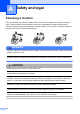
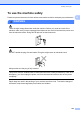
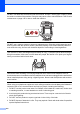
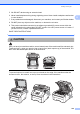

Table Of Contents
- USER’S GUIDE MFC-9120CN MFC-9320CW
- Approval Information and Compilation and Publication Notice
- EC Declaration of Conformity
- Table of Contents
- Section I: General
- 1 General information
- Using the documentation
- Accessing the Software User’s Guide and Network User’s Guide
- Viewing documentation
- Viewing documentation (Windows®)
- How to find scanning instructions
- Software User’s Guide:
- ScanSoft™ PaperPort™ 11SE with OCR How-to-Guides:
- How to find Network setup instructions
- Viewing documentation (Macintosh)
- How to find scanning instructions
- Software User’s Guide:
- Presto! PageManager User’s Guide:
- How to find Network setup instructions
- Viewing documentation
- Accessing Brother Support (For Windows®)
- Control panel overview
- 2 Loading paper and documents
- 3 General Setup
- 4 Security features
- 1 General information
- Section II: Fax
- 5 Sending a fax
- How to fax
- Broadcasting (black & white only)
- Additional sending operations
- Sending faxes using multiple settings
- Electronic cover page (black & white only)
- Contrast
- Changing Fax Resolution
- Dual access (black & white only)
- Real Time Transmission
- Overseas Mode
- Delayed Fax (black & white only)
- Delayed batch transmission (black & white only)
- Checking and cancelling waiting jobs
- Sending a fax manually
- Out of memory message
- 6 Receiving a fax
- 7 Telephone and external devices
- 8 Dialling and storing numbers
- 9 Remote Fax Options (black & white only)
- 10 Polling
- 11 Printing reports
- 5 Sending a fax
- Section III: Copy
- Section IV: Direct printing
- Section V: Software
- Section VI: Appendixes
- A Safety and legal
- B Options
- C Troubleshooting and routine maintenance
- Troubleshooting
- Error and maintenance messages
- Routine maintenance
- Replacing the consumable items
- Replacing periodic maintenance parts
- Machine Information
- Packing and shipping the machine
- D Menu and features
- E Specifications
- F Glossary
- Index
- brother UK/IRE

104
DO NOT use flammable substances near the machine. DO NOT use any type of spray to clean
the inside or outside of the machine. Doing this may cause a fire or electrical shock. See Routine
maintenance on page 145 for how to clean the machine.
DO NOT use a vacuum cleaner to clean up scattered toner. Doing this might cause the toner
dust to ignite inside the vacuum cleaner, potentially starting a fire. Please carefully clean the
toner dust with a dry, lint-free soft cloth and dispose of it according to local regulations.
This machine is heavy and weighs approximately 22.9 kg. To prevent injuries when moving or
lifting this machine, make sure to use at least two people. Be careful not to pinch your fingers
when you set the machine back down.
Use caution when installing or modifying telephone lines. Never touch telephone wires or
terminals that are not insulated unless the telephone line has been unplugged at the wall socket.
Never install telephone wiring during a lightning storm. Never install a telephone wall socket in
a wet location.
When using your telephone equipment, basic safety precautions should always be followed to
reduce the risk of fire, electrical shock and injury to people, including the following:
1 DO NOT use this product near water, for example, near a bath tub, wash bowl, kitchen sink
or washing machine, in a wet basement or near a swimming pool.
2 Avoid using this product during an electrical storm. There may be a remote risk of electric
shock from lightning.
3 DO NOT use this product to report a gas leak in the vicinity of the leak.
4 DO NOT dispose of batteries in a fire. They may explode. Check with local codes for possible
special disposal instructions.