
User Manual

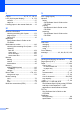
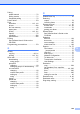
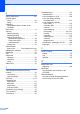

Table Of Contents
- USER’S GUIDE MFC-9120CN MFC-9320CW
- Approval Information and Compilation and Publication Notice
- EC Declaration of Conformity (EU only)
- Table of Contents
- Section I: General
- 1 General information
- Using the documentation
- Accessing the Software User’s Guide and Network User’s Guide
- Viewing documentation
- Viewing documentation (Windows®)
- How to find scanning instructions
- Software User’s Guide:
- ScanSoft™ PaperPort™ 11SE with OCR How-to-Guides:
- How to find Network setup instructions
- Viewing documentation (Macintosh)
- How to find scanning instructions
- Software User’s Guide:
- Presto! PageManager User’s Guide:
- How to find Network setup instructions
- Viewing documentation
- Accessing Brother Support (For Windows®)
- Control panel overview
- 2 Loading paper and documents
- 3 General Setup
- 4 Security features
- 1 General information
- Section II: Fax
- 5 Sending a fax
- How to fax
- Broadcasting (black & white only)
- Additional sending operations
- Sending faxes using multiple settings
- Electronic cover page (black & white only)
- Contrast
- Changing Fax Resolution
- Dual access (black & white only)
- Real Time Transmission
- Overseas Mode
- Delayed Fax (black & white only)
- Delayed batch transmission (black & white only)
- Checking and cancelling waiting jobs
- Sending a fax manually
- Out of memory message
- 6 Receiving a fax
- 7 Telephone and external devices
- 8 Dialling and storing numbers
- 9 Remote Fax Options (black & white only)
- 10 Polling
- 11 Printing reports
- 5 Sending a fax
- Section III: Copy
- Section IV: Direct printing
- Section V: Software
- Section VI: Appendixes
- A Safety and legal
- B Options
- C Troubleshooting and routine maintenance
- Troubleshooting
- Error and maintenance messages
- Routine maintenance
- Replacing the consumable items
- Replacing periodic maintenance parts
- Machine Information
- Packing and shipping the machine
- D Menu and features
- E Specifications
- F Glossary
- Index
- brother SAF/GLF

224
L
Labels ............................ 12, 13, 17, 18, 21
LCD (liquid crystal display)
............... 8, 179
contrast
.................................................27
Help List
................................................75
Loading paper in the manual feed slot
.....12
M
Machine information
checking remaining life of parts
..........173
page counts
........................................173
status LED
............................................10
Macintosh
See Software User’s Guide on the
CD-ROM.
Maintenance, routine
.............................142
checking the remaining life of parts
....173
replacing
belt unit
............................................164
drum units
........................................160
toner cartridge
..................................155
waste toner box
................................168
Manual
dialling
...................................................55
receive
..................................................45
transmission
..........................................43
Memory
adding DIMM (option)
.........................110
installing
...........................................110
storage
................................................179
Menu Table
................................... 179, 181
using menu keys
.................................179
Mode, entering
copy
......................................................78
fax
.........................................................36
scan
........................................................9
Multi-line connections (PBX)
....................52
N
N in 1 (page layout) ................................. 82
Network
faxing
See Software User’s Guide on the
CD-ROM.
printing
See Network User’s Guide on the
CD-ROM.
scanning
See Software User’s Guide on the
CD-ROM.
O
One touch
changing
............................................... 60
setting up
.............................................. 57
using
..................................................... 55
Out of Memory
message
.......................43, 84, 90, 95, 132
P
Packing and shipping the machine ........ 175
Page layout (N in 1)
................................. 82
Paper
...............................................17, 202
how to load
........................................... 11
in manual feed slot
............................ 12
in paper tray
...................................... 11
jam
...................................................... 137
recommended
................................17, 18
size
.................................................17, 24
size of document
........................204, 205
tray capacity
......................................... 18
type
.................................................17, 24
PaperPort™ 11SE with OCR
See Software User’s Guide on the CD-ROM
and Help in the PaperPort™ 11SE
application to access How-to-Guides.
PC Fax
See Software User’s Guide on the
CD-ROM.
PictBridge
DPOF printing
....................................... 88
specification
........................................ 208