
User Manual

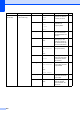
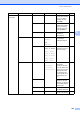
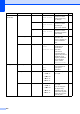
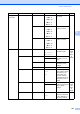
Table Of Contents
- USER’S GUIDE MFC-9120CN MFC-9320CW
- Approval Information and Compilation and Publication Notice
- EC Declaration of Conformity (EU only)
- Table of Contents
- Section I: General
- 1 General information
- Using the documentation
- Accessing the Software User’s Guide and Network User’s Guide
- Viewing documentation
- Viewing documentation (Windows®)
- How to find scanning instructions
- Software User’s Guide:
- ScanSoft™ PaperPort™ 11SE with OCR How-to-Guides:
- How to find Network setup instructions
- Viewing documentation (Macintosh)
- How to find scanning instructions
- Software User’s Guide:
- Presto! PageManager User’s Guide:
- How to find Network setup instructions
- Viewing documentation
- Accessing Brother Support (For Windows®)
- Control panel overview
- 2 Loading paper and documents
- 3 General Setup
- 4 Security features
- 1 General information
- Section II: Fax
- 5 Sending a fax
- How to fax
- Broadcasting (black & white only)
- Additional sending operations
- Sending faxes using multiple settings
- Electronic cover page (black & white only)
- Contrast
- Changing Fax Resolution
- Dual access (black & white only)
- Real Time Transmission
- Overseas Mode
- Delayed Fax (black & white only)
- Delayed batch transmission (black & white only)
- Checking and cancelling waiting jobs
- Sending a fax manually
- Out of memory message
- 6 Receiving a fax
- 7 Telephone and external devices
- 8 Dialling and storing numbers
- 9 Remote Fax Options (black & white only)
- 10 Polling
- 11 Printing reports
- 5 Sending a fax
- Section III: Copy
- Section IV: Direct printing
- Section V: Software
- Section VI: Appendixes
- A Safety and legal
- B Options
- C Troubleshooting and routine maintenance
- Troubleshooting
- Error and maintenance messages
- Routine maintenance
- Replacing the consumable items
- Replacing periodic maintenance parts
- Machine Information
- Packing and shipping the machine
- D Menu and features
- E Specifications
- F Glossary
- Index
- brother SAF/GLF

Menu and features
187
D
3.Copy
(Continued)
4.Color Adjust 1.Red b -nnnno+ a
b -nnnon+ a
b -nnonn+ a *
b -nonnn+ a
b -onnnn+ a
Adjusts the red colour
for copies.
82
2.Green b -nnnno+ a
b -nnnon+ a
b -nnonn+ a *
b -nonnn+ a
b -onnnn+ a
Adjusts the green
colour for copies.
3.Blue b -nnnno+ a
b -nnnon+ a
b -nnonn+ a *
b -nonnn+ a
b -onnnn+ a
Adjusts the blue
colour for copies.
4.Printer 1.Emulation — Auto*
HP LaserJet
BR-Script 3
Chooses the
emulation mode.
See
Software
User’s
Guide on
the
CD
-
ROM.
2.Print Options 1.
Internal Font
1.HP LaserJet Prints a list of the
machine’s internal
fonts.
2.BR-Script 3
2.
Configuration
— Prints a list of the
machine’s printer
settings.
3.Test Print — Prints a test page.
3.Output Color — Auto*
Color
B&W
Chooses colour or
black & white printed
documents. If you
choose Auto, the
machine selects a
suitable option for the
document (colour or
B&W).
4.Reset Printer — 1.Reset Restores the printer
settings to the original
factory default
settings.
See
Software
User’s
Guide on
the
CD
-
ROM.
2.Exit
5.Calibration — Calibrate
Reset
Adjusts the colour
density or returns the
colour calibration to
the factory settings.
151
Main Menu Submenu Menu Selections Options Descriptions Page