
User Manual
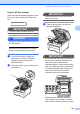
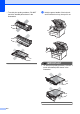
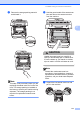
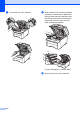
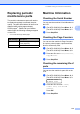
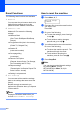
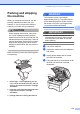
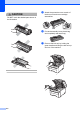
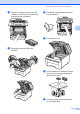
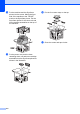
Table Of Contents
- USER’S GUIDE MFC-9120CN MFC-9320CW
- Approval Information and Compilation and Publication Notice
- EC Declaration of Conformity (EU only)
- Table of Contents
- Section I: General
- 1 General information
- Using the documentation
- Accessing the Software User’s Guide and Network User’s Guide
- Viewing documentation
- Viewing documentation (Windows®)
- How to find scanning instructions
- Software User’s Guide:
- ScanSoft™ PaperPort™ 11SE with OCR How-to-Guides:
- How to find Network setup instructions
- Viewing documentation (Macintosh)
- How to find scanning instructions
- Software User’s Guide:
- Presto! PageManager User’s Guide:
- How to find Network setup instructions
- Viewing documentation
- Accessing Brother Support (For Windows®)
- Control panel overview
- 2 Loading paper and documents
- 3 General Setup
- 4 Security features
- 1 General information
- Section II: Fax
- 5 Sending a fax
- How to fax
- Broadcasting (black & white only)
- Additional sending operations
- Sending faxes using multiple settings
- Electronic cover page (black & white only)
- Contrast
- Changing Fax Resolution
- Dual access (black & white only)
- Real Time Transmission
- Overseas Mode
- Delayed Fax (black & white only)
- Delayed batch transmission (black & white only)
- Checking and cancelling waiting jobs
- Sending a fax manually
- Out of memory message
- 6 Receiving a fax
- 7 Telephone and external devices
- 8 Dialling and storing numbers
- 9 Remote Fax Options (black & white only)
- 10 Polling
- 11 Printing reports
- 5 Sending a fax
- Section III: Copy
- Section IV: Direct printing
- Section V: Software
- Section VI: Appendixes
- A Safety and legal
- B Options
- C Troubleshooting and routine maintenance
- Troubleshooting
- Error and maintenance messages
- Routine maintenance
- Replacing the consumable items
- Replacing periodic maintenance parts
- Machine Information
- Packing and shipping the machine
- D Menu and features
- E Specifications
- F Glossary
- Index
- brother SAF/GLF

Troubleshooting and routine maintenance
175
C
Packing and shipping
the machine
C
When you transport the machine, use the
packing materials that came with your
machine. If you do not pack the machine
correctly, you could void your warranty.
CAUTION
When shipping the machine, each drum
unit / toner cartridge assembly and the
waste toner box must be removed from the
machine and put in a plastic bag. Failure to
remove these items and put them in plastic
bags before shipping may cause severe
damage to the machine and may void the
warranty.
Make sure that you have the following parts
for repacking:
1 Plastic bags – to be supplied by you, the
user; one for the waste toner box, and one
each for the four drum and toner cartridge
assemblies
2 Protective covers that were attached to the
original drum and toner cartridge
assemblies
3 Packing material for locking the belt unit
WARNING
This machine is heavy and weighs
approximately 22.9 kg. To prevent injuries
use at least two people to lift the machine.
Be careful not to pinch your fingers when
you put the machine back down.
IMPORTANT
Make sure that the machine has fully
cooled down by leaving it disconnected
from the power for at least 30 minutes
before packing.
a Turn off the machine.
b Unplug the machine from the telephone
wall socket.
c Unplug all the cables and AC power
cord from the machine.
d Fully open the top cover and take out all
the drum unit and toner cartridge
assemblies.
1
2
3