
Software User's Guide
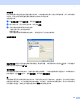
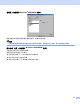
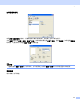
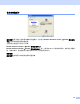
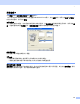
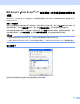
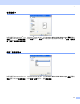
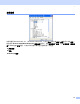
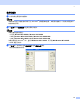
Table Of Contents
- 软件使用说明书MFC-8460N MFC-8860DN DCP-8060
- 目录
- 第一部分Windows®
- 1 打印
- 2 扫描
- 3 ControlCenter2
- 4 网络扫描 (适用于标配内置网络支持的型号)
- 5 远程设置 (不可用于DCP型号)
- 6 Brother PC-FAX 软件 (不可用于DCP型号)
- 第二部分Apple® Macintosh®
- 索引
- Brother中国

2.
34
使用扫描仪 2
a 打开软件应用程序扫描原稿。
注释
本说明书中用于扫描的说明只限于为 Windows
®
获取图像时使用。如果要扫描到另一个软件实用程序中,
则步骤可能不同。
b 从文件菜单的选择设备中选择使用的扫描仪。
注释
如果设备的连接是通过:
• 并行用 Brother MFC-XXXX 或 Brother DCP-XXXX
• USB 用 Brother MFC-XXXX USB 或 Brother DCP-XXXX USB
• LAN 用 Brother MFC-XXXX LAN 或 Brother DCP-XXXX LAN
如果使用的是 Windows
®
XP,选择 TW-Brother MFC XXXX,而不是 WIA-Brother MFC-XXXX。
(XXXX 是型号名称)
c 从文件的下拉菜单中选择获取图像或选择新建扫描按钮。
将出现扫描安装对话框: