
User Manual

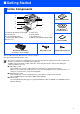
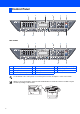
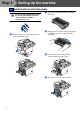
Table Of Contents
- Quick Setup Guide MFC-8460N/MFC-8860DN
- Getting Started
- Table of Contents
- Step1 Setting Up the machine
- Step2 Installing the Drivers & Software
- Supplied CD-ROM “MFL-Pro Suite”
- For USB Interface Cable Users (For Windows® 98/98SE/Me/2000 Professional/XP/XP Professional x64 Edition)
- For Parallel Interface Cable Users (For Windows® 98/98SE/Me/2000 Professional/XP/XP Professional x64 Edition)
- For Windows NT® Workstation Version 4.0 Users
- For Network Interface Cable Users (For Windows® 98/98SE/Me/NT/2000 Professional/XP/XP Professional x64 Edition)
- For USB Interface Cable Users
- For Network Interface Cable Users
- For Network Users and Administrators
- Options and Consumables
- brother UK/IRE/SAF

1
Carton components may differ from one country to another.
Save all packing materials and the carton.
Carton Components
Quick Setup Guide
CD-ROMs
For Windows
®
For Macintosh
®
User’s Guide
Drum Unit Assembly
(including Toner Cartridge)
AC Power Cord Telephone Line Cord
The interface cable is not a standard accessory. Please purchase the appropriate interface cable for the
interface you intend to use (Parallel, USB or Network).
Do NOT connect the interface cable at this time. Connecting the interface cable is done during the
software installation process.
■ USB interface cable
Please make sure you use a USB 2.0 interface cable that is no longer than 2.0 metres.
When you use a USB cable, make sure you connect it to the USB port of your computer and not to a
USB port on a keyboard or non-powered USB hub.
■ Parallel interface cable
Please make sure you use a Parallel interface cable that is no longer than 2.0 metres.
Use a shielded interface cable that is IEEE 1284-compliant.
■ Network cable
Use a straight-through Category 5 (or greater) twisted-pair cable for 10BASE-T or 100BASE-TX Fast
Ethernet Network.
1
. Automatic Document Feeder (ADF)
2
. Control Panel
3
. Face-down Output Tray
Support Flap (Support Flap)
4
. Front cover
5
. Paper Tray
6
. Power Switch
7
. Document Cover
8
. ADF Document Output Support Flap
1
6
2
3
4
5
8
7
■ Getting Started