
User Manual
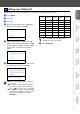
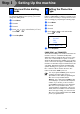
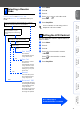
Table Of Contents
- Quick Setup Guide MFC-8460N/MFC-8860DN
- Getting Started
- Table of Contents
- Step1 Setting Up the machine
- Step2 Installing the Drivers & Software
- Supplied CD-ROM “MFL-Pro Suite”
- For USB Interface Cable Users (For Windows® 98/98SE/Me/2000 Professional/XP/XP Professional x64 Edition)
- For Parallel Interface Cable Users (For Windows® 98/98SE/Me/2000 Professional/XP/XP Professional x64 Edition)
- For Windows NT® Workstation Version 4.0 Users
- For Network Interface Cable Users (For Windows® 98/98SE/Me/NT/2000 Professional/XP/XP Professional x64 Edition)
- For USB Interface Cable Users
- For Network Interface Cable Users
- For Network Users and Administrators
- Options and Consumables
- brother UK/IRE/SAF

10
Your machine comes set for Tone dialling service. If
you have Pulse dialling service (rotary), you need to
change the dialling mode.
1
Press Menu.
2
Press 0.
3
Press 4.
4
Press or to select Pulse (or Tone).
Press OK.
5
Press Stop/Exit.
If you are connecting the machine to a line that
features a PABX (PBX) or ISDN to send and receive
faxes, it is also necessary to change the Phone Line
Type accordingly by completing the following steps.
1
Press Menu.
2
Press 0.
3
Press 6.
4
Press or to select the mode.
Press OK.
5
Press Stop/Exit.
PABX (PBX) and TRANSFER
The machine is initially set to Normal, which lets the
machine connect to a standard PSTN (Public
Switched Telephone Network) line. However, many
offices use a central telephone system or Private
Automatic Branch Exchange (PABX). Your machine
can be connected to most types of PABX (PBX). The
machine’s recall feature supports timed break recall
only (TBR). TBR will work with most PABX (PBX)
systems allowing you to gain access to an outside
line, or transfer calls to another extension. The
feature works when Tel/R is pressed.
7
Tone and Pulse dialling
mode
8
Setting the Phone line
Type
06.Phone Line set
a
Normal
PBX
b
ISDN
Select
ab
& OK
You can program a Tel/R key press as part of
a number stored in a One-Touch or
Speed-Dial location. When programming the
One-Touch or Speed-Dial number
(Menu, 2, 3, 1 or 2, 3, 2) press Tel/R first (the
screen displays “!”), then enter the telephone
number. If you do this, you do not need to
press Tel/R each time before you dial using a
One-Touch or Speed-Dial location. (See
“Storing numbers” in Chapter 8 of the User’s
Guide.) However, if PBX is not selected in the
Phone Line Type setting, you cannot use the
One-Touch or Speed-Dial number that Tel/R
press is programmed into.
Step 1
Setting Up the machine