
User Manual
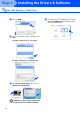
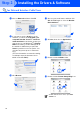
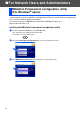
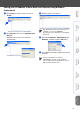
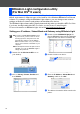
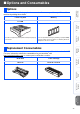

Table Of Contents
- Quick Setup Guide MFC-8460N/8860DN
- Getting Started
- Table of Contents
- Step1 Setting Up the machine
- Step2 Installing the Drivers & Software
- Supplied CD-ROM “MFL-Pro Suite”
- For USB Interface Cable Users (For Windows® 98/98SE/Me/2000 Professional/XP/XP Professional x64 Edition)
- For Parallel Interface Cable Users (For Windows® 98/98SE/Me/2000 Professional/XP/XP Professional x64 Edition)
- For Windows NT® Workstation Version 4.0 Users
- For Network Interface Cable Users (For Windows® 98/98SE/Me/NT/2000 Professional/XP/XP Professional x64 Edition)
- For USB Interface Cable Users
- For USB Interface Cable Users
- For Network Users and Administrators
- Options and Consumables
- Brother ENG

30
■ For Network Users and Administrators
The BRAdmin Professional utility for Windows
®
is designed to manage your Brother network
connected devices such as network-ready Multifunction devices and/or network-ready printers
in a Local Area Network (LAN) environment.
For more information on BRAdmin Professional and BRAdmin Light, go to
http://solutions.brother.com
Installing the BRAdmin Professional configuration utility
1 Put the supplied CD-ROM into your CD-ROM drive.
The opening screen will appear automatically.
Follow the on-screen instructions.
2 Click the Install Optional Applications icon on the main menu screen.
3 Click BRAdmin Professional and follow the on-screen instructions.
BRAdmin Professional configuration utility
(For Windows
®
users)