
User Manual

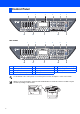
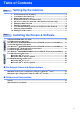
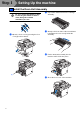
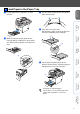
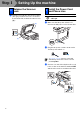
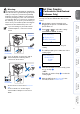
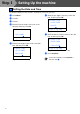
Table Of Contents
- Quick Setup Guide MFC-8460N/MFC-8860DN
- Getting Started
- Table of Contents
- Step1 Setting Up the machine
- 1 Install the Drum Unit Assembly
- 2 Load Paper in the Paper Tray
- 3 Release the Scanner Lock
- 4 Install the Power Cord and Phone Line
- 5 Set Your Country (For Australia / New Zealand Customer Only)
- 6 Setting the Date and Time
- 7 Setting your Station ID
- 8 Tone and Pulse dialling mode (not available for New Zealand)
- 9 Selecting a Receive Mode
- 10 Setting the LCD Contrast
- Step2 Installing the Drivers & Software
- Supplied CD-ROM “MFL-Pro Suite”
- For USB Interface Cable Users (For Windows® 98/98SE/Me/2000 Professional/XP/XP Professional x64 Edition)
- For Parallel Interface Cable Users (For Windows® 98/98SE/Me/2000 Professional/XP/XP Professional x64 Edition)
- For Windows NT® Workstation Version 4.0 Users
- For Network Interface Cable Users (For Windows® 98/98SE/Me/NT/2000 Professional/XP/XP Professional x64 Edition)
- For USB Interface Cable Users
- For Network Interface Cable Users
- For Network Users and Administrators
- Options and Consumables
- brother ARL/ASA/NZ

2
MFC-8460N
MFC-8860DN
Control Panel
1 One Touch keys 2 Status LED 3 LCD (Liquid Crystal Display)
4 Menu keys 5 Dial Pad 6 Stop/Exit key
7 Start key 8 Copy keys 9 Mode keys
10 Fax and telephone keys 11 Print keys
For the details of the control panel, see “Control panel overview” in Chapter 1 of the User’s Guide.
When you move the machine, grasp the side handholds that are under the scanner. Do NOT carry the
machine by holding it at the bottom.
981011
12 345
6
7
981011
12 345
6
7