
User Manual


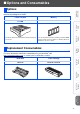
Table Of Contents
- Quick Setup Guide MFC-8460N/MFC-8860DN
- Getting Started
- Table of Contents
- Step1 Setting Up the machine
- 1 Install the Drum Unit Assembly
- 2 Load Paper in the Paper Tray
- 3 Release the Scanner Lock
- 4 Install the Power Cord and Phone Line
- 5 Set Your Country (For Australia / New Zealand Customer Only)
- 6 Setting the Date and Time
- 7 Setting your Station ID
- 8 Tone and Pulse dialling mode (not available for New Zealand)
- 9 Selecting a Receive Mode
- 10 Setting the LCD Contrast
- Step2 Installing the Drivers & Software
- Supplied CD-ROM “MFL-Pro Suite”
- For USB Interface Cable Users (For Windows® 98/98SE/Me/2000 Professional/XP/XP Professional x64 Edition)
- For Parallel Interface Cable Users (For Windows® 98/98SE/Me/2000 Professional/XP/XP Professional x64 Edition)
- For Windows NT® Workstation Version 4.0 Users
- For Network Interface Cable Users (For Windows® 98/98SE/Me/NT/2000 Professional/XP/XP Professional x64 Edition)
- For USB Interface Cable Users
- For Network Interface Cable Users
- For Network Users and Administrators
- Options and Consumables
- brother ARL/ASA/NZ

37
The
machine
has the following optional accessories. You can expand the capabilities of the
machine by adding these items.
When the time comes to replace consumables, an error message will be indicated on the LCD.
For more information about the consumables for your machine, visit
http://solutions.brother.com or contact your local Brother re-seller.
Options
Lower Tray Unit Memory
LT-5300
Second lower paper tray unit expands total input capacity up
to 500 sheets.
You can expand the memory by installing a (144-pin DIMM)
memory module. For more details, see “Memory Board” in
Chapter B of the User’s Guide.
Replacement Consumables
Drum Unit Toner Cartridge
DR-3115 TN-3145 / TN-3185
■ Options and Consumables
Setting Up
the machine
Windows
®
USB
Windows
®
Parallel
Windows
NT
®
4.0
Parallel
Macintosh
®
USB
Macintosh
®
Network
Windows
®
Network
Network
Administrators