
User Manual
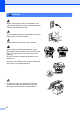
Table Of Contents
- USER’S GUIDE MFC-8460N/MFC-8860DN
- Approval Information and Compilation and Publication Notice
- Table of Contents
- Section I : General
- 1 General information
- Using the documentation
- Accessing the complete User’s Guide
- Viewing documentation
- Viewing documentation (Windows®)
- How to find Scanning instructions
- Software User's Guide:
- PaperPort® User's Guide:
- How to find Internet FAX instructions (MFC-8860DN only)
- Viewing Documentation (Macintosh®)
- How to find Scanning instructions
- Software User's Guide:
- Presto!® PageManager® User's Guide:
- How to find Internet FAX instructions (MFC-8860DN only)
- Viewing documentation
- Control panel overview
- 2 Loading documents and paper
- 3 General setup
- 4 Security features
- 1 General information
- Section II : Fax
- 5 Sending a fax
- How to fax
- Broadcasting
- Additional sending operations
- 6 Receiving a fax
- 7 Phone and external devices
- 8 Dialling and storing numbers
- 9 Remote fax options
- 10 Printing reports
- 11 Polling
- 5 Sending a fax
- Section III : Copy
- Section IV : Software
- Section V : Appendices
- A : Safety and Legal
- B : Options
- C : Troubleshooting and routine maintenance
- D : Menu and Features
- E : Specifications E
- F : Glossary
- Index
- brother IND

84
WARNING
Before cleaning the inside of the machine, first
unplug the telephone line cord, and then the power
cord from the electrical socket.
Do not handle the plug with wet hands. Doing this
might cause an electrical shock.
Always make sure the plug is fully inserted.
After you have just used the machine, some
internal parts of the machine will be extremely hot.
When you open the front or back cover of the
machine,
DO NOT touch the shaded parts shown in the
illustration.
The fuser unit is marked with a caution label. DO
NOT remove or damage the label.
To prevent injuries, be careful not to put your
hands on the edge of the machine under the
document cover as shown in the illustration.