
User Manual
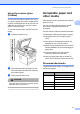
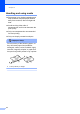
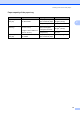
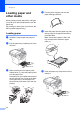
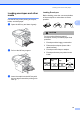
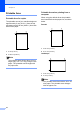
Table Of Contents
- USER’S GUIDE MFC-8460N/MFC-8860DN
- Approval Information and Compilation and Publication Notice
- Table of Contents
- Section I : General
- 1 General information
- Using the documentation
- Accessing the complete User’s Guide
- Viewing documentation
- Viewing documentation (Windows®)
- How to find Scanning instructions
- Software User's Guide:
- PaperPort® User's Guide:
- How to find Internet FAX instructions (MFC-8860DN only)
- Viewing Documentation (Macintosh®)
- How to find Scanning instructions
- Software User's Guide:
- Presto!® PageManager® User's Guide:
- How to find Internet FAX instructions (MFC-8860DN only)
- Viewing documentation
- Control panel overview
- 2 Loading documents and paper
- 3 General setup
- 4 Security features
- 1 General information
- Section II : Fax
- 5 Sending a fax
- How to fax
- Broadcasting
- Additional sending operations
- 6 Receiving a fax
- 7 Phone and external devices
- 8 Dialling and storing numbers
- 9 Remote fax options
- 10 Printing reports
- 11 Polling
- 5 Sending a fax
- Section III : Copy
- Section IV : Software
- Section V : Appendices
- A : Safety and Legal
- B : Options
- C : Troubleshooting and routine maintenance
- D : Menu and Features
- E : Specifications E
- F : Glossary
- Index
- brother IND

Loading documents and paper
15
2
Loading envelopes and other
media 2
Use the MP tray when printing envelopes,
labels, and thick paper.
a Open the MP tray and lower it gently.
b Pull out the MP tray support.
c Insert the media into the MP tray with
the top edge first and the printing side
face up.
Loading Envelopes 2
Before loading, press the corners and sides
of the envelopes to make them as flat as
possible.
CAUTION
Do not use the following types of
envelopes, as they will cause paper feed
problems:
1 Envelopes with a baggy construction.
2 Embossed envelopes (those with a
raised surface).
3 Envelopes with clasps or staples.
4 Envelopes that are pre-printed on the
inside.
Glue 2
Rounded
flap
2
Double
flap
2
Triangular
flap
2