
User Manual
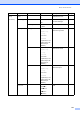
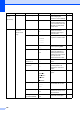
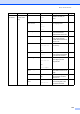
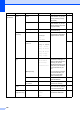
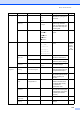
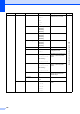
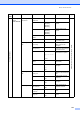
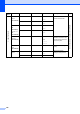
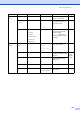
Table Of Contents
- USER’S GUIDE MFC-8460N/MFC-8860DN
- Approval Information and Compilation and Publication Notice
- Table of Contents
- Section I : General
- 1 General information
- Using the documentation
- Accessing the complete User’s Guide
- Viewing documentation
- Viewing documentation (Windows®)
- How to find Scanning instructions
- Software User's Guide:
- PaperPort® User's Guide:
- How to find Internet FAX instructions (MFC-8860DN only)
- Viewing Documentation (Macintosh®)
- How to find Scanning instructions
- Software User's Guide:
- Presto!® PageManager® User's Guide:
- How to find Internet FAX instructions (MFC-8860DN only)
- Viewing documentation
- Control panel overview
- 2 Loading documents and paper
- 3 General setup
- 4 Security features
- 1 General information
- Section II : Fax
- 5 Sending a fax
- How to fax
- Broadcasting
- Additional sending operations
- 6 Receiving a fax
- 7 Phone and external devices
- 8 Dialling and storing numbers
- 9 Remote fax options
- 10 Printing reports
- 11 Polling
- 5 Sending a fax
- Section III : Copy
- Section IV : Software
- Section V : Appendices
- A : Safety and Legal
- B : Options
- C : Troubleshooting and routine maintenance
- D : Menu and Features
- E : Specifications E
- F : Glossary
- Index
- brother IND

Menu and Features
139
Main Menu Submenu Menu Selections Options Descriptions Page
7.Machine
Info.
1.Serial No. ——
You can check the serial
number of your machine.
126
2.Page
Counter
— Total
Copy
Print
List/Fax
You can check the number of
total pages the machine has
printed during its life.
126
3.Parts Life 1.Drum
2.Fuser
3.Laser
4.PF Kit MP
5.PF Kit 1
6.PF Kit 2
—
You can check the percentage
of a machine part’s life that
remains available.
PF Kit 2 appears only
when the optional LT-5300 tray
is installed.
126
0.Initial
Setup
1.Receive
Mode
— Fax Only*
Fax/Tel
External TAD
Manual
Chooses the receive mode that
best suits your needs.
39
2.Date/Time ——
Puts the date and time on the
LCD and in headings of faxes
you send.
See
Quick
Setup
Guide
3.Station ID — Fax:
Tel:
Name:
Sets your name and fax
number to appear on each
page you fax.
4.Tone/Pulse — Tone*
Pulse
Chooses the dialling mode.
57
5.Dial Tone — Detection
No Detection*
You can shorten the dial tone
detect pause.
103