
User Manual
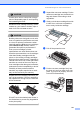
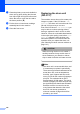
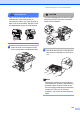
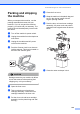
Table Of Contents
- USER’S GUIDE MFC-8460N/MFC-8860DN
- Approval Information and Compilation and Publication Notice
- Table of Contents
- Section I : General
- 1 General information
- Using the documentation
- Accessing the complete User’s Guide
- Viewing documentation
- Viewing documentation (Windows®)
- How to find Scanning instructions
- Software User's Guide:
- PaperPort® User's Guide:
- How to find Internet FAX instructions (MFC-8860DN only)
- Viewing Documentation (Macintosh®)
- How to find Scanning instructions
- Software User's Guide:
- Presto!® PageManager® User's Guide:
- How to find Internet FAX instructions (MFC-8860DN only)
- Viewing documentation
- Control panel overview
- 2 Loading documents and paper
- 3 General setup
- 4 Security features
- 1 General information
- Section II : Fax
- 5 Sending a fax
- How to fax
- Broadcasting
- Additional sending operations
- 6 Receiving a fax
- 7 Phone and external devices
- 8 Dialling and storing numbers
- 9 Remote fax options
- 10 Printing reports
- 11 Polling
- 5 Sending a fax
- Section III : Copy
- Section IV : Software
- Section V : Appendices
- A : Safety and Legal
- B : Options
- C : Troubleshooting and routine maintenance
- D : Menu and Features
- E : Specifications E
- F : Glossary
- Index
- brother IND

Troubleshooting and routine maintenance
125
Packing and shipping
the machine C
When you transport the machine, use the
packing materials that came with your
machine. If you do not pack the machine
properly, you could void your warranty. The
machine should be adequately insured with
the carrier.
a Turn off the machine’s power switch.
b Unplug the machine from the telephone
wall socket.
c Unplug all the cables and AC power
cord from the machine.
d Push the Scanner Lock Lever down to
lock the scanner. This lever is located on
the left of the scanner glass.
CAUTION
Damage caused to your machine by failure
to lock the scanner before packing and
shipping may void your warranty.
e Open the front cover.
f Take out the drum unit and toner
cartridge assembly. Leave the toner
cartridge installed in the drum unit.
g Put the drum unit and toner cartridge
assembly into the plastic bag and seal
the bag.
h Close the front cover.
i Wrap the machine in the plastic bag and
put it in the original carton with the
original packing material.
j Pack the drum unit and toner cartridge
assembly, AC power cord and printed
materials in the original carton as shown
below.
k Close the carton and tape it shut.