
User Manual
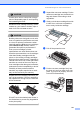
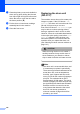
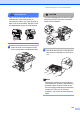
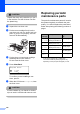
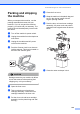
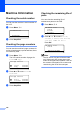
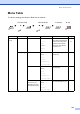
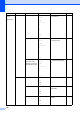
Table Of Contents
- USER’S GUIDE MFC-8460N/MFC-8860DN
- Approval Information and Compilation and Publication Notice
- Table of Contents
- Section I : General
- 1 General information
- Using the documentation
- Accessing the complete User’s Guide
- Viewing documentation
- Viewing documentation (Windows®)
- How to find Scanning instructions
- Software User's Guide:
- PaperPort® User's Guide:
- How to find Internet FAX instructions (MFC-8860DN only)
- Viewing Documentation (Macintosh®)
- How to find Scanning instructions
- Software User's Guide:
- Presto!® PageManager® User's Guide:
- How to find Internet FAX instructions (MFC-8860DN only)
- Viewing documentation
- Control panel overview
- 2 Loading documents and paper
- 3 General setup
- 4 Security features
- 1 General information
- Section II : Fax
- 5 Sending a fax
- How to fax
- Broadcasting
- Additional sending operations
- 6 Receiving a fax
- 7 Phone and external devices
- 8 Dialling and storing numbers
- 9 Remote fax options
- 10 Printing reports
- 11 Polling
- 5 Sending a fax
- Section III : Copy
- Section IV : Software
- Section V : Appendices
- A : Safety and Legal
- B : Options
- C : Troubleshooting and routine maintenance
- D : Menu and Features
- E : Specifications E
- F : Glossary
- Index
- brother IND

124
CAUTION
Unpack the drum unit just before you put it
in the machine. Put the old drum unit into
the plastic bag.
c Unpack the new drum unit.
d Put the toner cartridge firmly into the
new drum unit until you hear it lock into
place. If you put it in properly, the lock
lever will lift automatically.
e Put the drum unit and toner cartridge
assembly back in the machine.
Do not close the front cover.
f Press Clear/Back.
Replace Drum?
a 1.Yes
b 2.No
Select ab
& OK
To confirm you are installing a new
drum, press 1.
g When the LCD shows Accepted, close
the front cover.
CAUTION
If toner scatters on your hands or clothes,
wipe or wash it off with cold water at once.
Replacing periodic
maintenance parts C
The periodic maintenance parts will need to
be replaced regularly to maintain the print
quality. You should replace the parts listed
below after printing the following number of
pages.
1
At 5% print coverage (A4 or Letter size).
The actual number of printed pages will vary
depending on the print jobs and paper you use.
LCD
message
Description Approximate
life
Replace
PF KitMP
Replace paper
feeding kit for MP tray.
10,000 pages
1
Replace
PF Kit1
Replace paper
feeding kit for Tray 1.
80,000 pages
1
Replace
PF Kit2
Replace paper
feeding kit for Tray 2.
80,000 pages
1
Replace
Fuser
Replace fuser unit.
100,000 pages
1
Replace
Laser
Replace laser unit.
100,000 pages
1