
User Manual

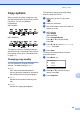
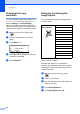
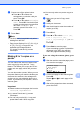
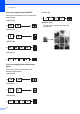
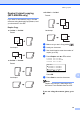
Table Of Contents
- USER'S GUIDE MFC-8460N/MFC-8860DN
- Approval Information and Compilation and Publication Notice
- Table of Contents
- General
- Fax
- Copy
- Software
- Appendices
- lndex

Making copies
72
12
Duplex (2-sided) copying
(MFC-8860DN only) 12
If you want to automatically copy a 2-sided
document using the duplex copy feature, load
your document in the ADF.
Duplex Copy 12
1 sided i 2 sided
Portrait
Landscape
2 sided i 2 sided
Portrait
Landscape
2 sided i 1 sided
Portrait
Landscape
a Make sure you are in Copy mode
b Load your document.
c Use the dial pad to enter the number of
copies (up to 99).
d Press Duplex and a or b to select
1sided i 2sided,
2sided i 2sided or
2sided i 1sided.
Duplex
a1sided i 2sided
2sided
i 2sided
b2sided i 1sided
Select ba & OK
Press OK.
e Press Start to scan the document.
Note
Duplex copy using a 2-sided legal size
document is not available from the ADF.
If you are using the scanner glass, go to
f.
1
2
1
1
2
1
1
2
1
2
1
1
2
1
1
2
1
1
2
1
1
2
1
2
1
1
2
1
1
2
1
2