
User Manual
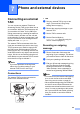
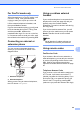
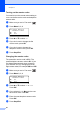

Table Of Contents
- USER'S GUIDE MFC-8460N/MFC-8860DN
- Approval Information and Compilation and Publication Notice
- Table of Contents
- General
- Fax
- Copy
- Software
- Appendices
- lndex

Chapter 7
45
Multi-Line connections
(PABX) 7
Most offices use a central telephone system.
Brother recommends that all our Fax/MFC
machines be connected to a discreet
(dedicated) line. Although a partcular PABX
may appear to work with a particular model of
fax machine, we cannot guarantee that the
unit will operate correctly.
While it is often relatively simple to connect a
fax machine ot a PABX, (Private Automatic
Branch Exchang), we suggest that you
contact the company that installed your
telephone system and ask them to connect
the fax machine for you.
Brother does not recommend the use of a
PABX line. PABX limitations in general can
cause some functions of the fax machine not
to work correctly.
External and extension
phones 7
Note
You need to turn the remote codes setting
to on to use the fax receive code l51 and
telephone answering code #51. See
Using remote codes on page 46.
Operation from extension
telephones 7
If you answer a fax call on an extension
telephone, or an external telephone that is
correctly connected to the machine into the
correct socket on the machine, you can make
your machine take the call by using the fax
receive code. When you press the fax receive
code l51, the machine starts to receive the
fax. (See Fax Detect on page 40.)
If you answer a call and no one is on
the line:
7
You should assume that you’re receiving a
manual fax.
a Press l 51 and wait for the chirp or until
the machine’s LCD shows Receiving,
and then hang up.
Note
You can also use the Fax Detect feature to
make your machine tactically take the call.
(See Fax Detect on page 40.)