
User Manual
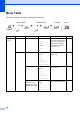
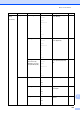
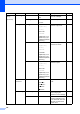
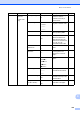
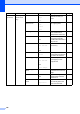
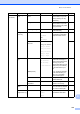
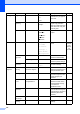
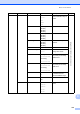
Table Of Contents
- USER'S GUIDE MFC-8460N/MFC-8860DN
- Approval Information and Compilation and Publication Notice
- Table of Contents
- General
- Fax
- Copy
- Software
- Appendices
- lndex

131
3.Copy 1.Quality — Photo
Text
Auto*
You can choose the Copy
resolution for your type of
document.
68
2.FB Txt
Quality
— 1200×600dpi
600dpi*
You can change to the
higher Copy resolution
when you make a text copy
with 100% ratio using the
scanner glass.
69
3.Contrast — -nnnno+
-nnnon+
-nnonn+*
-nonnn+
-onnnn+
Adjusts the contrast for
copies.
74
4.Printer 1.Emulation — Auto(EPSON)*
Auto(IBM)
HP LaserJet
BR-Script 3
Epson FX-850
IBM Proprinter
Chooses the emulation
mode.
See
Software
User’s
Guide on
the
CD-ROM.
2.Print
Options
1.Internal Font — Prints a list of the
machine’s internal fonts.
2.Configuration — Prints a list of the
machine’s printer settings.
3.Reset
Printer
— 1.Reset
2.Exit
Returns the PCL setting to
the default settings.
5.Print
Reports
1.XMIT
Verify
1.View on LCD
2.Print Report
— You can view the your last
200 outgoing faxes at most
and print the last report.
63
2.Help List — — Prints the Help List so you
can see at-a-glance how to
quickly program your
machine.
63
3.Tel Index
List
1.Numeric
2.Alphabetic
— Lists name and numbers
stored in the One-Touch
and Speed-Dial memory,
in numerical or
alphabetical order.
63
4.Fax
Journal
— — Lists information about
your last 200 incoming and
outgoing faxes. (TX means
Transmit.) (RX means
Receive.)
63
5.User
Settings
— — Lists your settings. 63
6.Network
Config
— — Lists your Network
settings.
63
Main Menu Submenu Menu Selections Options Descriptions Page