
User Manual
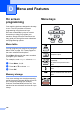
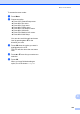
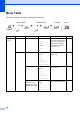
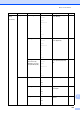
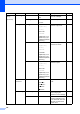
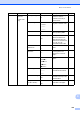
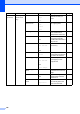
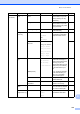
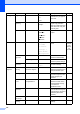
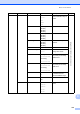
Table Of Contents
- USER'S GUIDE MFC-8460N/MFC-8860DN
- Approval Information and Compilation and Publication Notice
- Table of Contents
- General
- Fax
- Copy
- Software
- Appendices
- lndex

127
1.General
Setup
(Continued)
5.Ecology 1.Toner Save On
Off*
Increases the page yield of
the toner cartridge.
20
2.Sleep Time (0-99)
05 Min*
Conserves power. 21
6.Tray Use 1.Copy Tray#1 Only
Tray#2 Only
MP Only
MP>T1>T2*
T1>T2>MP
(Tray#2 Only or T2
appears only if you
installed the optional
paper tray.)
Selects the tray that will be
used for Copy mode.
18
2.Fax Tray#1 Only
Tray#2 Only
MP Only
MP>T1>T2
T1>T2>MP*
(Tray#2 Only or T2
appears only if you
installed the optional
paper tray.)
Selects the tray that will be
used for Fax mode.
19
3.Print Tray#1 Only
Tray#2 Only
MP Only
MP>T1>T2*
T1>T2>MP
(Tray#2 Only or T2
appears only if you
installed the optional
paper tray.)
Selects the tray that will be
used for PCprint.
19
7.LCD
Contrast
— -nnnno+
-nnnon+
-nnonn+*
-nonnn+
-onnnn+
Adjusts the contrast of the
LCD.
21
8.Security 1.Setting Lock — Stops unauthorized users
from changing the
machine’s current settings.
22
2.Function Lock — Can restrict selected
machine operation for up
to 25 individual users and
all other non-authorized
Public users.
23
Main Menu Submenu Menu Selections Options Descriptions Page