
User Manual
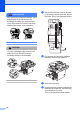
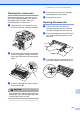
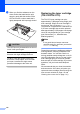
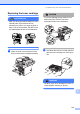
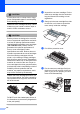
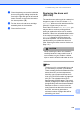
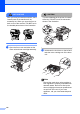
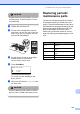

Table Of Contents
- USER'S GUIDE MFC-8460N/MFC-8860DN
- Approval Information and Compilation and Publication Notice
- Table of Contents
- General
- Fax
- Copy
- Software
- Appendices
- lndex

Troubleshooting and routine maintenance
120
C
CAUTION
Unpack the drum unit just before you put it
in the machine. Put the old drum unit into
the plastic bag.
c Unpack the new drum unit.
d Put the toner cartridge firmly into the
new drum unit until you hear it lock into
place. If you put it in properly, the lock
lever will lift automatically.
e Put the drum unit and toner cartridge
assembly back in the machine.
Do not close the front cover.
f Press Clear/Back.
Replace Drum?
a 1.Yes
b 2.No
Select ab & OK
To confirm you are installing a new
drum, press 1.
g When the LCD shows Accepted, close
the front cover.
CAUTION
If toner scatters on your hands or clothes,
wipe or wash it off with cold water at once.
Replacing periodic
maintenance parts C
The periodic maintenance parts will need to
be replaced regularly to maintain the print
guality. The parts listed below will have to be
replaced after printing approximately 25,000
pages for the paper feeding kit for MP tray
and 100,000 pages for the other parts.
Please call your Brother dealer for service
when the following messages appear on the
LCD.
LCD message Description
Replace PF
KitMP
Replace paper feeding kit for
MP tray.
Replace PF
Kit1
Replace paper feeding kit for
Tray 1.
Replace PF
Kit2
Replace paper feeding kit for
Tray 2.
Replace Fuser Replace fuser unit.
Replace Laser Replace laser unit.