
User Manual
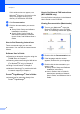
Table Of Contents
- USER'S GUIDE MFC-8460N/MFC-8860DN
- Approval Information and Compilation and Publication Notice
- Table of Contents
- General
- Fax
- Copy
- Software
- Appendices
- lndex

Chapter 1
3
If this window does not appear, use
Windows
®
Explorer to find and run the
setup.exe program from the root
directory of the Brother CD-ROM.
d Click Documentation.
e Click the documentation you want to
read:
Setup Guide: Setup and software
installation instructions.
User's Guide: User’s Guide for
stand-alone operations, Network
User’s Guide, and Software User’s
Guide.
How to find Scanning instructions 1
There are several ways you can scan
documents. You can find the instructions as
follows:
Software User's Guide: 1
Scanning a document using the using the
TWAIN driver in Chapter 2
Scanning a document using the WIA driver
(For Windows
®
XP only) in Chapter 2
Using ControlCenter2 in Chapter 3
Network Scanning (For models with built-
in network support) in Chapter 4
Presto!
®
PageManager
®
User's Guide:1
Instructions for scanning directly from
Presto!
®
PageManager
®
How to find Internet FAX instructions
(MFC-8860DN only)
1
You can find the instructions in the Network
User’s Guide on the CD-ROM.
Viewing Documentation (Macintosh
®
) 1
a Turn on your Macintosh
®
. Insert the
Brother CD-ROM into your CD-ROM
drive. The following window will appear.
b Double-click the Documentation icon.
c If the language selection screen
appears, double-click your language.
d Double-click the documentation you
want to read:
Setup Guide: Setup and Software
installation instructions.
User's Guides: User’s Guide for
stand-alone operations, Network
User’s Guide, and Software User’s
Guide.