
User Manual
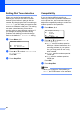
Table Of Contents
- USER'S GUIDE MFC-8460N/MFC-8860DN
- Approval Information and Compilation and Publication Notice
- Table of Contents
- General
- Fax
- Copy
- Software
- Appendices
- lndex

99
Setting Dial Tone detection C
When you send a fax automatically, by
default your machine will wait for a fixed
amount of time before it starts to dial the
number. By changing the Dial Tone setting to
Detection you can make your machine dial
as soon as it detects a dial tone. This setting
can save a small amount of time when
sending a fax to many different numbers. If
you change the setting and start having
problems with dialling you should change
back to the default No Detection setting.
a Press Menu, 0, 5.
05.Dial Tone
a Detection
b No Detection
Select ab & OK
b Press a or b to select Detection or
No Detection.
Press OK.
c Press Stop/Exit.
Compatibility C
If you are having difficulty sending or
receiving a fax due to possible interference
on the phone line, we recommend that you
adjust the compatibility setting to reduce the
modem speed for fax operations.
a Press Menu, 2, 0.
20.Compatibility
a High
Normal
b Basic
Select ab & OK
b Press a or b to choose Basic or
Normal (or High).
Basic cuts the modem speed to
9600 bps. Unless interference is a
recurring problem on your phone
line, you may prefer to use it only
when needed.
Normal sets the modem speed at
14400 bps.
High sets the modem speed at
33600 bps.
Press OK.
c Press Stop/Exit.
Note
When you change the Compatibility to
Basic, the ECM feature is not available.