
User Manual
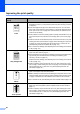
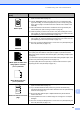
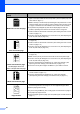
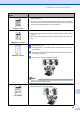
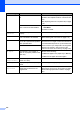
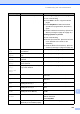
Table Of Contents
- USER'S GUIDE MFC-8460N/MFC-8860DN
- Approval Information and Compilation and Publication Notice
- Table of Contents
- General
- Fax
- Copy
- Software
- Appendices
- lndex

95
Improving the print quality C
Examples of poor print
quality
Recommendation
Faint
Check the machine’s environment. Conditions such as humidity, high
temperatures, and so on, may cause this print fault. (See Choosing a location
on page 79.)
If the whole page is too light, Toner Save mode may be on. Turn off Toner
Save mode in the machine’s menu settings or in the printer Properties of the
driver. (See Toner save on page 20 or Advanced tab in the Software User’s
Guide on the CD-ROM.)
If this problem occurs when making copies or printing received faxes, turn off
Toner Save mode in the machine’s menu setting. (See Toner save on page
20.)
Clean the scanner window and the primary corona wire of the drum unit. (See
Cleaning the laser scanner window on page 112 and Cleaning the corona wire
on page 114.) If the print quality has not improved, put in a new drum unit.
(See Replacing the drum unit (DR-3150) on page 118.)
Put in a new toner cartridge. (See Replacing the toner cartridge (TN-3135/TN-
3175) on page 115.)
Grey background
Make sure that you use paper that meets our specifications. (See Acceptable
paper and other media on page 11.)
Check the machine’s environment. Conditions such as high temperatures and
high humidity can increase the amount of background shading. (See
Choosing a location on page 79.)
Install a new toner cartridge. (See Replacing the toner cartridge (TN-3135/TN-
3175) on page 115.)
Clean the primary corona wire and the drum unit. (See Cleaning the corona
wire on page 114 and Cleaning the drum unit on page 114.) If the print quality
has not improved, put in a new drum unit. (See Replacing the drum unit
(DR-3150) on page 118.)
Ghost
Make sure that you use paper that meets our specifications. Rough-surfaced
paper or thick paper may cause this problem.
Make sure that you choose the correct media type in the printer driver or in the
machine’s Paper Type menu setting. (See Acceptable paper and other media
on page 11 and Basic tab in the Software User’s Guide on the CD-ROM.)
Put in a new drum unit. (See Replacing the drum unit (DR-3150) on page 118.)
Toner specks
Make sure that you use paper that meets our specifications. Rough-surfaced
paper may cause the problem. (See Acceptable paper and other media on
page 11.)
Clean the primary corona wire and the drum unit. (See Cleaning the corona
wire on page 114 and Cleaning the drum unit on page 114.) If the print quality
has not improved, put in a new drum unit. (See Replacing the drum unit
(DR-3150) on page 118.)
ABCDEFGH
abcdefghijk
ABCD
abcde
01234
C
DE
F
d
ef
g
BC
b
c
d
2
3
ABCDEFGH
abcdefghijk
ABCD
abcde
01234
ABCDEFGH
abcdefghijk
ABCD
abcde
01234