
User Manual
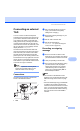

Table Of Contents
- USER’S GUIDE MFC-8460N/MFC-8860DN
- Approval Information and Compilation and Publication Notice
- Table of Contents
- Section I: General
- General information
- Using the documentation
- Accessing the complete User’s Guide
- Viewing documentation
- Viewing documentation (Windows®)
- How to find Scanning instructions
- Software User's Guide:
- PaperPort® User's Guide:
- How to find Internet FAX instructions (MFC-8860DN only)
- Viewing Documentation (Macintosh®)
- How to find Scanning instructions
- Software User's Guide:
- Presto!® PageManager® User's Guide:
- How to find Internet FAX instructions (MFC-8860DN only)
- Viewing documentation
- Control panel overview
- Loading documents and paper
- General setup
- Security features
- General information
- Section II: Fax
- Sending a fax
- How to fax
- Broadcasting
- Additional sending operations
- Receiving a fax
- Phone and external devices
- Phone line services
- Telephone Service for Australia
- Telephone Service for New Zealand
- Telephone Service for Some Countries
- Connecting an external TAD
- External and extension phones
- Dialling and storing numbers
- Remote fax options
- Printing reports
- Polling
- Sending a fax
- Section III: Copy
- Section IV: Software
- Section V: Appendices
- A Safety and Legal
- B Options
- C Troubleshooting and routine maintenance
- D Menu and Features
- E Specifications E
- F Glossary
- Index
- brother ARL/ASA/NZ

Phone and external devices
57
7
For Fax/Tel mode only 7
When the machine is in Fax/Tel mode, it will
use the F/T Ring Time (pseudo/double-
ringing) to alert you to pick up a voice call.
Lift the external telephone’s handset, and
then press Hook to answer.
If you’re at an extension phone, you will need
to lift the handset during the F/T Ring Time
and then press #51 (#91 for New Zealand),
between the pseudo/double rings. If no one is
on the line, or if someone wants to send you
a fax, send the call back to the machine by
pressing l51 (l91 for New Zealand).
Connecting an external or
extension phone 7
You can connect a separate telephone
directly to your machine as shown in the
diagram below.
1 Extension telephone
2 External telephone
When you are using an external telephone,
the LCD shows Telephone.
Using a cordless external
handset 7
If your cordless telephone is connected to the
telephone line cord (see page 57) and you
typically carry the cordless handset
elsewhere, it is easier to answer calls during
the Ring Delay.
If you let the machine answer first, you will
have to go to the machine so you can press
Hook to transfer the call to the cordless
handset.
Note
Not all brands of cordless phones are
compatible for use with your machine.
Using remote codes 7
Fax Receive Code 7
If you answer a fax call on an extension or
external telephone, you can tell your machine
to receive it by dialling the fax receive code
l51 (l91 for New Zealand). Wait for the
chirping sounds then replace the handset.
See Fax Detect on page 42. Your caller will
have to press Start to send the fax.
Telephone Answer Code 7
If you receive a voice call and the machine is
in F/T mode, it will start to sound the F/T
(double) ring after the initial ring delay. If you
pick up the call on an extension phone you
can turn the F/T ring off by pressing #51 (#91
for New Zealand) (make sure you press this
between the rings).
(Example for Australia)
1
2