
User Manual
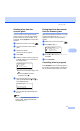
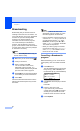


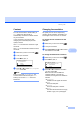
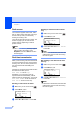

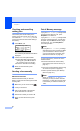
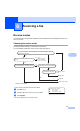
Table Of Contents
- USER’S GUIDE MFC-8460N/MFC-8860DN
- Approval Information and Compilation and Publication Notice
- Table of Contents
- Section I: General
- General information
- Using the documentation
- Accessing the complete User’s Guide
- Viewing documentation
- Viewing documentation (Windows®)
- How to find Scanning instructions
- Software User's Guide:
- PaperPort® User's Guide:
- How to find Internet FAX instructions (MFC-8860DN only)
- Viewing Documentation (Macintosh®)
- How to find Scanning instructions
- Software User's Guide:
- Presto!® PageManager® User's Guide:
- How to find Internet FAX instructions (MFC-8860DN only)
- Viewing documentation
- Control panel overview
- Loading documents and paper
- General setup
- Security features
- General information
- Section II: Fax
- Sending a fax
- How to fax
- Broadcasting
- Additional sending operations
- Receiving a fax
- Phone and external devices
- Phone line services
- Telephone Service for Australia
- Telephone Service for New Zealand
- Telephone Service for Some Countries
- Connecting an external TAD
- External and extension phones
- Dialling and storing numbers
- Remote fax options
- Printing reports
- Polling
- Sending a fax
- Section III: Copy
- Section IV: Software
- Section V: Appendices
- A Safety and Legal
- B Options
- C Troubleshooting and routine maintenance
- D Menu and Features
- E Specifications E
- F Glossary
- Index
- brother ARL/ASA/NZ

39
6
6
Receive modes 6
You must choose a receive mode depending on the external devices and telephone services you
have on your line.
Choosing the receive mode 6
The diagram below will help you choose the correct mode.
For more detailed information on the receive modes see page 40.
1
FaxAbility in New Zealand
Receiving a fax 6
To set a receive mode follow the instructions below.
a Press Menu, 0, 1.
b Press a or b to select a receive mode. Press OK.
c Press Stop/Exit.
01.Receive Mode
a Fax Only
Fax/Tel
b External TAD
Select ab & OK
The LCD will display the current receive mode.
Do you use a Distinctive Ring subscriber
service?
Yes
Yes
No
Go to
"Distinctive Ring"
in the Chapter 7
of the User's Guide
No
Yes
No
Yes
Manual
Fax Only
Yes
External TAD
No
Fax/Tel
1
1
Are you connecting an external telephone or external telephone answering
device to the machine?
Are you using the voice message function of
your external telephone answering device?
Do you want the machine to answer
fax and telephone calls automatically?
No
No
Do you want to use the
machinefor Fax only?