
User Manual


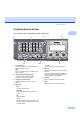
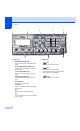


Table Of Contents
- USER’S GUIDE MFC-8460N/MFC-8860DN
- Approval Information and Compilation and Publication Notice
- Table of Contents
- Section I: General
- General information
- Using the documentation
- Accessing the complete User’s Guide
- Viewing documentation
- Viewing documentation (Windows®)
- How to find Scanning instructions
- Software User's Guide:
- PaperPort® User's Guide:
- How to find Internet FAX instructions (MFC-8860DN only)
- Viewing Documentation (Macintosh®)
- How to find Scanning instructions
- Software User's Guide:
- Presto!® PageManager® User's Guide:
- How to find Internet FAX instructions (MFC-8860DN only)
- Viewing documentation
- Control panel overview
- Loading documents and paper
- General setup
- Security features
- General information
- Section II: Fax
- Sending a fax
- How to fax
- Broadcasting
- Additional sending operations
- Receiving a fax
- Phone and external devices
- Phone line services
- Telephone Service for Australia
- Telephone Service for New Zealand
- Telephone Service for Some Countries
- Connecting an external TAD
- External and extension phones
- Dialling and storing numbers
- Remote fax options
- Printing reports
- Polling
- Sending a fax
- Section III: Copy
- Section IV: Software
- Section V: Appendices
- A Safety and Legal
- B Options
- C Troubleshooting and routine maintenance
- D Menu and Features
- E Specifications E
- F Glossary
- Index
- brother ARL/ASA/NZ

General information
7
1
10 Fax and telephone keys
Hook
Lets you answer an incoming call on an
external phone.
When connected to a PBX, you can use this
key to gain access to an outside line, to recall
an operator, or to transfer a call to another
extension.
Resolution
Sets the resolution when sending a fax.
Search/Speed Dial
Lets you look up numbers stored in the
dialling memory and LDAP server*
(*MFC-8860DN only).
You can search the stored number
alphabetically.
It also lets you look up the stored number in
Speed-Dial numbers by pressing Shift and
Search/Speed-Dial simultaneously and
then the three-digit number.
Redial/Pause
Redials the last number called. It also inserts
a pause when programming quick dial
numbers.
11 Print keys
Secure
When using Secure Function Lock, you can
switch restricted users by holding down Shift
as press Secure. (See Secure Function
Lock on page 24.)
You can print data saved in memory by
entering your four-digit password. (For
details about using the Secure key, see the
Software User’s Guide on the CD-ROM
.)
Job Cancel
Press this key to cancel a print job and clear
the machine’s memory.