
User Manual


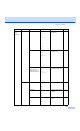

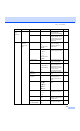

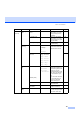
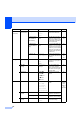

Table Of Contents
- USER’S GUIDE MFC-8460N/MFC-8860DN
- Approval Information and Compilation and Publication Notice
- Table of Contents
- Section I: General
- General information
- Using the documentation
- Accessing the complete User’s Guide
- Viewing documentation
- Viewing documentation (Windows®)
- How to find Scanning instructions
- Software User's Guide:
- PaperPort® User's Guide:
- How to find Internet FAX instructions (MFC-8860DN only)
- Viewing Documentation (Macintosh®)
- How to find Scanning instructions
- Software User's Guide:
- Presto!® PageManager® User's Guide:
- How to find Internet FAX instructions (MFC-8860DN only)
- Viewing documentation
- Control panel overview
- Loading documents and paper
- General setup
- Security features
- General information
- Section II: Fax
- Sending a fax
- How to fax
- Broadcasting
- Additional sending operations
- Receiving a fax
- Phone and external devices
- Phone line services
- Telephone Service for Australia
- Telephone Service for New Zealand
- Telephone Service for Some Countries
- Connecting an external TAD
- External and extension phones
- Dialling and storing numbers
- Remote fax options
- Printing reports
- Polling
- Sending a fax
- Section III: Copy
- Section IV: Software
- Section V: Appendices
- A Safety and Legal
- B Options
- C Troubleshooting and routine maintenance
- D Menu and Features
- E Specifications E
- F Glossary
- Index
- brother ARL/ASA/NZ

148
2.Fax
(Continued)
0.
Miscellaneous
1.Compatibility High*
Normal
Basic
Adjusts the equalization for
transmission difficulties.
116
2.Distinctive
(Not available in
New Zealand)
On
Off*
Use with phone company
distinctive ringing service
allows you to have a voice
number and fax number on
the one phone line.
46
53
2.Faxability
(For New Zealand
Only)
On
Off*
If you have FaxAbility from
Telecom, you can use this
function to store the ringing
pattern of your fax number.
And if you set in to ON, you
should use the registered
number only.
50
3.Caller ID Display#
Print Reports
View or print a list of the
last 30 Caller IDs stored in
memory.
48
52
54
3.Copy 1.Quality — Photo
Text
Auto*
You can choose the Copy
resolution for your type of
document.
79
2.FB Txt
Quality
— 1200×600dpi
600dpi*
You can change to the
higher Copy resolution
when you make a text copy
with 100% ratio using the
scanner glass.
80
3.Contrast — -nnnno+
-nnnon+
-nnonn+*
-nonnn+
-onnnn+
Adjusts the contrast for
copies.
85
4.Printer 1.Emulation — Auto(EPSON)*
Auto(IBM)
HP LaserJet
BR-Script 3
Epson FX-850
IBM Proprinter
Chooses the emulation
mode.
See
Software
User
’
s
Guide on
the
CD-ROM.
2.Print
Options
1.Internal Font — Prints a list of the
machine’s internal fonts.
2.Configuration — Prints a list of the
machine’s printer settings.
3.Reset
Printer
— 1.Reset
2.Exit
Returns the PCL setting to
the default settings.
Main Menu Submenu Menu Selections Options Descriptions Page