
User Manual
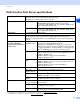
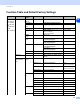
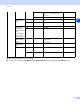
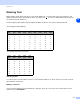
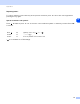
Table Of Contents
- Network USER’S GUIDE
- Table of contents
- 1 Introduction
- 2 Configuring your network printer
- Overview
- IP addresses, subnet masks and gateways
- Setting the IP address and subnet mask
- Changing the print server settings
- 3 Control Panel Setup
- LAN Main Setup Menu
- TCP/IP
- Ethernet
- Setup Internet (MFC-8860DN only)
- Setup Mail RX (MFC-8860DN only)
- Setup Mail TX (MFC-8860DN only)
- Setup Relay (MFC-8860DN only)
- Scan to E-mail (E-mail server) (MFC-8860DN only)
- Scan to FTP
- Fax to Server (MFC-8860DN only)
- Time Zone (MFC-8860DN only)
- Restoring the network settings to factory default
- Printing the Network Configuration List
- LAN Main Setup Menu
- 4 Network printing from Windows® basic TCP/IP Peer-to-Peer printing
- 5 Internet printing for Windows®
- Overview
- Quick Tips
- Brother Internet Print General Information
- Brother Internet Print: Configuring the Brother Print Server
- Brother Internet Print: Using the BRAdmin Professional utility to Configure the Print Server
- Brother Internet Print: Using a Web Browser to Configure the Print Server
- Brother Internet Print: Installing the BIP software on Windows® 98/Me/2000/XP and Windows NT® 4.0
- Adding a Second Brother Internet Port
- Windows® 2000/XP and Windows Vista® IPP printing
- Specifying a different URL
- Other sources of information
- Overview
- 6 Network printing from a Macintosh®
- 7 Web Based Management
- 8 LDAP Operation (MFC-8860DN only)
- 9 Internet Fax (MFC-8860DN only)
- Overview
- Getting Connected
- Control Panel Key Functions
- Sending an Internet Fax
- Manually Entering Text
- Receiving E-mail or Internet Fax
- Receiving an Internet Fax to your computer
- Forwarding Received E-mail and Fax Messages
- Using E-mail notification with user authentication
- Relay Broadcasting
- TX Verification Mail
- Setup Mail (TX)
- Setup Mail (RX)
- Error mail
- Important information on Internet Fax
- Overview
- 10 Brother Internet Fax Printing Software (MFC-8860DN only)
- 11 Troubleshooting
- Appendix A
- Using services
- Other ways to set the IP address (for advanced users and Administrators)
- Using DHCP to configure the IP address
- Using BOOTP to configure the IP address
- Using RARP to configure the IP address
- Using APIPA to configure the IP address
- Using ARP to configure the IP address
- Using the TELNET console to configure the IP address
- Using the Brother Web BRAdmin server software for IIS* to configure the IP address
- Installation when using a Network Print Queue or Share (printer driver only)
- Multi-function Print Server specifications
- Function Table and Default Factory Settings
- Entering Text
- Index

I
99
I
Index
A
APIPA ............................................. 5, 18, 90
ARP .......................................................... 90
B
BFP Address Book ................................... 73
BFP Port ................................................... 69
BINARY_P1 ............................................. 88
BIP ........................................................... 35
BOOTP ........................................... 5, 14, 89
BRAdmin Light ......................................... 51
BRAdmin Professional ......................... 9, 10
BRN_xxxxxx_P1 ...................................... 88
BRN_xxxxxx_P1_A1 ................................ 88
Broadcasting ............................................ 74
Brother Internet Fax Printing Software ..... 67
Brother Solutions Center ...................... 9, 51
Browser .................................................... 53
C
Control panel ............................................ 10
D
DHCP ............................................. 5, 15, 88
DNS ........................................ 11, 41, 43, 53
DNS Client ................................................. 5
DNS Server .............................................. 18
E
E-mail ....................................................... 35
Ethernet .................................................... 19
F
Firewall ..................................................... 84
FTP ............................................................ 6
G
Gateway ............................................... 8, 16
H
HTTP .............................................. 6, 11, 53
Hyper Text Transfer Protocol ............. 11, 53
I
IIS ............................................................. 92
Internet ..................................................... 35
Internet Printing ........................................ 35
IP Address ............................................ 7, 15
IPP ........................................... 6, 35, 41, 87
IPv6 ...................................................... 6, 19
ISP ........................................................... 36
L
LAN menu ................................................ 13
LDAP .................................................... 6, 54
LDAP Operation ....................................... 57
LED (Print Server) .................................... 78
LPR/LPD .................................................... 5
M
Macintosh
®
Printing .................................. 45
mDNS ......................................................... 6
MIME ........................................................ 35
N
Network Configuration List ....................... 31
Network Printing ....................................... 32
Network Shared Printing ............................ 4
P
Password ........................................... 32, 41
PCL_P1 .................................................... 88
Peer-to-Peer ............................................... 3
Ping .................................................... 78, 81
POP3 ........................................................ 36
Port9100 ..................................................... 5
POSTSCRIPT_P1 .................................... 88
Print Server Settings ................................ 10
Protocol ...................................................... 5
R
RARP ............................................. 5, 14, 89
Remote Setup .......................................... 11
Restoring the network settings ................. 30
RFC 1001 ................................................. 88
Router ........................................................ 8