
User Manual
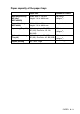
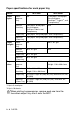
Table Of Contents
- USER'S GUIDE MFC-8440 MFC-8840D
- APPROVAL INFORMATION
- Compilation and Publication Notice
- "EC"Declararion of Conformity
- Safety precautions
- Choosing a location
- Quick Reference Guide
- Table of Contents
- 1 Introduction
- 2 Paper
- 3 On-screen programming
- 4 Getting started
- Initial Setup
- General Setup
- Setting the Mode Timer
- Setting the Paper Type
- Setting the Paper Size
- Setting the Ring Volume
- Setting the Beeper Volume
- Setting the Speaker Volume
- Turning on Automatic Daylight Savings Time
- Toner Save
- Sleep Time
- Turning off the Scanner Lamp
- Power Save
- Setting the Tray Use for Copy mode
- Setting the Tray Use for Fax mode
- Setting the LCD Contrast
- Initial Setup depending on Your Country
- 5 Setup Receive
- 6 Setup Send
- How to Fax
- Basic sending operations
- Advanced sending operations
- 7 Auto Dial numbers and dialling options
- 8 Remote Fax Options
- 9 Printing reports
- 10 Making copies
- 11 Using the MFC as a printer
- 12 Printer driver settings
- 13 How to scan using Windows®
- Scanning a document
- Scanning a document (For Windows® XP only)
- Using the scan key (For USB or Parallel interface cable users)
- Using ScanSoft® PaperPort® and OmniPage® OCR
- 14 Using the Brother Control Center
- 15 Using the Windows®-Based Brother SmartUI Control Center
- Brother SmartUI Control Center
- Brother Control Center features
- Hardware Section: Changing the Scan to button configuration
- Software Section
- Scan to File
- Scan to E-mail
- Scan to OCR (Word Processing program)
- Scan to Graphics application (example: Microsoft Paint)
- Fax setting (PC-Fax using the Brother Fax Driver)
- Custom: User-defined buttons
- 16 Using MFC Remote Setup
- 17 Using Brother PC-FAX software
- PC-FAX sending
- Speed-Dial setup
- The Address Book
- Setting up a Member in the Address Book
- Setting up a Group for Broadcasting
- Editing Member information
- Deleting a Member or Group
- Exporting the Address Book
- Importing to the Address Book
- Setting up a Cover Page
- You can enter information in each field
- Sending a file as a PC-FAX using the Facsimile style
- Sending a file as a PC-FAX using the Simple style
- Setting up PC-FAX receiving (Windows® 98/98SE/Me/2000 Professional and Windows NT® WS 4.0 only)
- Receiving a fax into the PC (Windows® XP only)
- 18 Using your MFC with a Macintosh®
- Setting up your USB-equipped Apple® Macintosh®
- Using the Brother printer driver with your Apple® Macintosh® (Mac OS® 8.6 - 9.2)
- Using the Brother Printer Driver with Your Apple® Macintosh® (Mac OS® X)
- Using the PS driver with your Apple® Macintosh®
- Sending a fax from your Macintosh® application
- Using the Brother TWAIN scanner driver with your Macintosh®
- Using Presto!® PageManager®
- MFC Remote Setup (Mac OS® X)
- 19 Network Scanning
- 20 Brother Network PC-FAX software
- 21 Important information
- 22 Troubleshooting and routine maintenance
- 23 Optional accessories
- Glossary
- Specifications
- Index
- Remote Retrieval Access card
- brother UK/IRE/SAF/PAN NORDIC

2 - 4 PAPER
Paper specifications for each paper tray
*1 Up to 3 envelopes
*2 Up to 10 sheets
Model MFC-8440 MFC-8840D
Paper
types
Multi-
purpose
tray
N/A Plain paper, Bond paper,
Recycled paper,
Envelope*
1
, Labels*
2
, and
Transparency*
2
Manual
feed tray
Plain paper, Bond paper,
Recycled paper,
Envelope, Labels, and
Transparency
N/A
Paper tray Plain paper, Recycled paper, and Transparency*
2
Optional
Lower tray
Plain paper, Recycled paper, and Transparency*
2
Paper
weights
Multi-
purpose
tray
N/A 60 to 161 g/m
2
Manual
feed tray
60 to 161 g/m
2
N/A
Paper tray 60 to 105 g/m
2
Optional
Lower tray
60 to 105 g/m
2
Paper
sizes
Multi-
purpose
tray
N/A Width: 69.8 to 220 mm
Height: 116 to 406.4 mm
Manual
feed tray
Width: 69.8 to 220 mm
Height: 116 to 406.4 mm
N/A
Paper tray A4, Letter, Legal, B5 (ISO), B5 (JIS), Executive, A5, A6,
B6 (ISO)
Optional
Lower Tray
A4, Letter, Legal, B5 (ISO), B5 (JIS), Executive, A5,
B6 (ISO)
When printing transparencies, remove each one from the
face-down output tray after it exits the MFC.