
User Manual
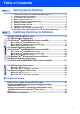
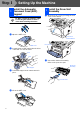
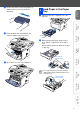
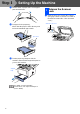
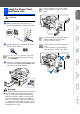
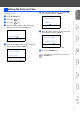
Table Of Contents
- Quick Setup Guide MFC-8440/MFC-8840D/MFC-8840DN
- Getting Started
- Table of Contents
- Step1 Setting Up the Machine
- 1 Install the Automatic Document Feed (ADF) Support
- 2 Install the Drum Unit Assembly
- 3 Load Paper in the Paper Tray
- 4 Release the Scanner Lock
- 5 Install the Power Cord and Phone Line
- 6 Selecting a Receive Mode
- 7 Setting the Date and Time
- 8 Setting Your Station ID
- 9 Selecting Your Language (Canada Only)
- 10 Sending in the Product Registration and Test Sheet (USA Only)
- Step2 Installing the Driver & Software
- Supplied CD-ROM “MFL-Pro Suite”
- For USB Interface Cable Users (For Windows® 98/98SE/Me/2000 Professional/XP)
- For Parallel Interface Cable Users (For Windows® 98/98SE/Me/2000 Professional/XP)
- For Windows NT® Workstation Version 4.0 Users
- For Network Interface Cable Users (For Windows® 98/98SE/Me/NT/2000 Professional/XP)
- For USB Interface Cable Users
- For Network Interface Cable Users
- For Administrators
- brother USA

9
Setting Up
the Machine
Windows
®
USB
Windows
®
Parallel
Windows
NT
®
4.0
Parallel
Macintosh
®
USB
Macintosh
®
Network
Windows
®
Network
For
Administrators
The MFC displays the date and time, and prints it on
every fax you send.
1
Press the Menu key.
2
Press the key.
3
Press the key.
4
Enter the last two digits of the year on the
dial pad, and then press the Set key.
(e.g. Enter 0, 5 for 2005.)
5
Enter the two digits for the month on the dial
pad, and then press the Set key.
(e.g. Enter 0, 3 for March.)
6
Enter the two digits for the day on the dial
pad, and then press the Set key.
(e.g. Enter 0, 1.)
7
Enter the time in 24-hour format on the dial
pad, and then press the Set key.
(e.g. Enter 1, 5, 2, 5 for 3:25 P.M.)
8
Press the Stop/Exit key.
7 Setting the Date and Time
02.Date/Time
Year:2005
Enter & Set Key
02.Date/Time
XX/XX/2005
Month:03
Enter & Set Key
02.Date/Time
03/XX/2005
Day:01
Enter & Set Key
02.Date/Time
03/01/2005
Time:15:25
Enter & Set Key
If you want to repeat from step1, press the
Stop/Exit key.