
User Manual
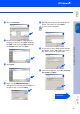
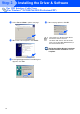
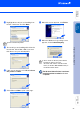
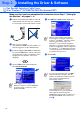
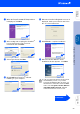
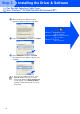
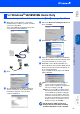
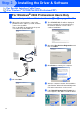
Table Of Contents
- Quick Setup Guide MFC-8440 MFC-8840D
- Getting Started
- Table of Contents
- Step1 Setting Up the Machine
- Step2 Installing the Driver & Software
- Supplied CD-ROM (MFL-Pro Suite)
- For USB Interface Cable Users (For Windows® 98/98SE/Me/2000 Professional/XP)
- For Parallel Interface Cable Users (For Windows® 98/98SE/Me/2000 Professional/XP)
- For Windows NT® Workstation Version 4.0 Users
- For Network Interface Cable Users (For Windows® 98/98SE/Me/NT/2000 Professional/XP)
- For USB Interface Cable Users
- For Network Interface Cable Users
- For Administrators
- brother UK

19
Installing the Driver & Software
W
Select Yes and Next to print a test page.
X
When this screen appears, click Finish.
Y
If the Digital Signature Not Found dialog box
appears, click Yes.
Z
If the test page printed, click OK.
The Brother Native Drivers have been
installed and the installation is now
complete.
For USB Interface Cable Users
(For Windows
®
98/98SE/Me/2000 Professional/XP)
There will be two Brother printer drivers
listed in the Printers selection.
The driver with “Printer” after the model
name (ex. Brother MFC-8840D Printer) is
the Brother Native Driver.
Step 2