
User Manual
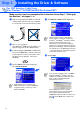
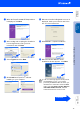
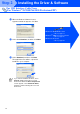

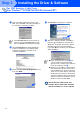
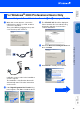
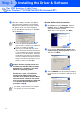
Table Of Contents
- Quick Setup Guide MFC-8440 MFC-8840D
- Getting Started
- Table of Contents
- Step1 Setting Up the Machine
- Step2 Installing the Driver & Software
- Supplied CD-ROM (MFL-Pro Suite)
- For USB Interface Cable Users (For Windows® 98/98SE/Me/2000 Professional/XP)
- For Parallel Interface Cable Users (For Windows® 98/98SE/Me/2000 Professional/XP)
- For Windows NT® Workstation Version 4.0 Users
- For Network Interface Cable Users (For Windows® 98/98SE/Me/NT/2000 Professional/XP)
- For USB Interface Cable Users
- For Network Interface Cable Users
- For Administrators
- brother UK

13
Installing the Driver & Software
D
When the Brother Software License
Agreement window appears, click Yes.
E
Select Local Interface, and then click Next.
F
Select Standard, and then click Next.
The application files will be copied and
installed to your computer.
For USB Interface Cable Users
(For Windows
®
98/98SE/Me/2000 Professional/XP)
If you want to install the PS driver, select
Custom and then follow the on-screen
instructions. When the Select Components
screen appears, check PS Printer Driver,
and then continue following the on-screen
instructions.
Windows
®
98/98SE/Me Users
➝
Go to page 14
Windows
®
2000 Professional Users
➝
Go to page 16
Windows
®
XP Users
➝
Go to page 20
Step 2