
Quick Start Manual

3
Table of Contents
Setting Up the Machine
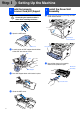
1. Install the Automatic Document Feed (ADF) Support .................................... 4
2. Install the Drum Unit Assembly........................................................................4
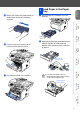
3. Load Paper in the Paper Tray ...........................................................................5
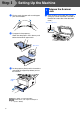
4. Release the Scanner Lock.................................................................................6
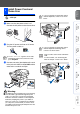
5. Install Power Cord and Phone Line..................................................................7
6. Selecting a Receive Mode .................................................................................8
7. Setting the Date and Time .................................................................................9
8. Setting Your Station ID ....................................................................................10
9. Selecting Your Language (Canada Only).......................................................11
10. Sending in the Product Registration and Test Sheet (USA Only) ...............11
Installing the Driver & Software
Supplied CD-ROM (MFL-Pro Suite).................................................................... 12
For USB Interface Cable Users
(For Windows
®
98/98SE/Me/2000 Professional/XP)................................ 14
■
For Windows
®
98/98SE/Me Users Only ............................................................ 17
■
For Windows
®
2000 Professional Users Only..................................................19
■
For Windows
®
XP Users Only ...........................................................................22
For Parallel Interface Cable Users
(For Windows
®
98/98SE/Me/2000 Professional/XP)................................ 25
■
For Windows
®
98/98SE/Me Users Only ............................................................ 28
■
For Windows
®
2000 Professional Users Only..................................................29
■
For Windows
®
XP Users Only ...........................................................................32
For Windows NT
®
Workstation Version 4.0 Users ................................. 35
For Network Interface Cable Users
(For Windows
®
98/98SE/Me/NT/2000 Professional/XP)..........................38
For USB Interface Cable Users................................................................. 42
■
For Mac OS
®
8.6 to 9.2 .......................................................................................42
■
For Mac OS
®
X 10.1/10.2.1 or greater................................................................44
For Network Interface Cable Users .......................................................... 46
■
For Mac OS
®
8.6 to 9.2 .......................................................................................46
■
For Mac OS
®
X 10.1/10.2.1 or greater................................................................48
■
For Administrators
Network User's Guide Chapter Map (NC-9100h) .............................................. 50
Installing the BRAdmin Professional Configuration Utility
(Windows
®
Users Only) .................................................................................... 51
Web BRAdmin (Windows
®
Users Only) ............................................................ 51
Setting your IP Address, Subnet Mask and Gateway using BRAdmin
Professional (Windows
®
Users Only) .............................................................. 52
Options ................................................................................................................. 53
Replacement Consumables................................................................................ 53
Step 1
Step 2