
Quick Start Manual

21
S
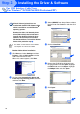
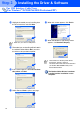
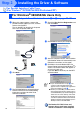
Make sure X:\ENG\W2K\Addprt is
displayed in the window and click OK (X:\ is
the drive letter of your CD-ROM).
T
Highlight the model you are installing from
the list of machines and click Next.
U
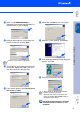
The model you are installing will be listed in
the window. Select Yes or No if you want
this driver to be your default printer.
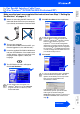
V
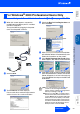
If this screen appears, select Do not share
this printer and Next.
W
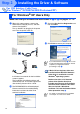
Select Yes and Next to print a test page.
X
When this screen appears, click Finish.
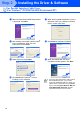
Y
If the Digital Signature Not Found dialog box
appears, click Yes.
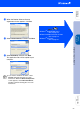
Z
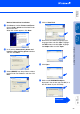
If the test page printed, click OK.
The Brother Native Drivers have been
installed and the installation is now
complete.
Make sure you select a USB printer.
There will be two Brother printer drivers
listed in the Printers selection.
The driver with "Printer" after the model
name (ex. Brother MFC-8840D Printer) is
the Brother Native Driver.
Installing the Driver & Software
Setting Up
the Machine
Windows
®
USB
For
Administrators