
User Guide




Table Of Contents
- USER’S GUIDE MFC-8480DN/MFC-8680DN/MFC-8690DW/MFC-8890DW
- Brother numbers
- Ordering accessories and supplies
- Notice - Disclaimer of Warranties (USA and Canada)
- Compilation and Publication Notice
- Brother™ One-Year Limited Warranty and Replacement Service (USA Only)
- BROTHER MULTIFUNCTION CENTER / FAX MACHINELIMITED WARRANTY (Canada only)
- Table of Contents
- Section I: General
- 1 General information
- Using the documentation
- Accessing the Software User’s Guide and Network User’s Guide
- Viewing documentation
- Viewing documentation (Windows®)
- How to find scanning instructions
- Software User’s Guide:
- ScanSoft™ PaperPort™ 11SE with OCR How-to-Guides:
- How to find Network setup instructions (MFC-8690DW and MFC-8890DW)
- Viewing documentation (Macintosh)
- How to find scanning instructions
- Software User’s Guide:
- Presto! PageManager User’s Guide:
- How to find Network setup instructions (MFC-8690DW and MFC-8890DW)
- Viewing documentation
- Accessing Brother support (Windows®)
- Control panel overview
- 2 Loading paper and documents
- 3 General Setup
- 4 Security features
- 1 General information
- Section II: Fax
- 5 Sending a fax
- How to fax
- Broadcasting
- Additional sending operations
- 6 Receiving a fax
- 7 Telephone services and external devices
- 8 Dialing and storing numbers
- 9 Remote Fax Options
- 10 Polling
- 11 Printing reports
- 5 Sending a fax
- Section III: Copy
- Section IV:Direct printing
- Section V:Software
- Section VI: Appendixes
- A Safety and legal
- B Options
- C Troubleshooting and routine maintenance
- D Menu and features
- E Specifications
- F Glossary
- Index
- brother USA/CAN
Sending a fax
41
5
Broadcasting 5
Broadcasting lets you send the same fax
message to more than one fax number. You
can include Groups, One Touch, Speed Dial
numbers and up to 50 manually dialed
numbers in the same broadcast.
You can broadcast up to 390 different
numbers. This will depend on how many
groups, access codes or credit card numbers
you have stored, and on how many delayed
or stored faxes in memory.
Note
Use Search/Speed Dial to help you
choose numbers easily.
a Make sure you are in Fax mode .
b Load your document.
c Enter a number.
Press OK.
You can use either a One Touch, Speed
Dial, a Group number, or a number
manually entered using the dial pad.
(See How to dial on page 63.)
d Repeat step c until you have entered
all the fax numbers you want to
broadcast to.
e Press Start.
After the broadcast is finished the machine
will print a broadcast report to let you know
the results.
Note
• The scan profile of the One-Touch,
Speed-Dial or Group number you chose
first will be applied to the broadcast.
• (MFC-8690DW and MFC-8890DW) If the
Fax Resolution setting of the fax number
you chose first is S.Fine and you enter a
stored I-Fax number, Select Std/Fine
will appear on the LCD. Press Stop/Exit.
Press Resolution and choose
Standard, Fine or Photo then re-enter
the I-Fax number. If you want to enter
another number, go back to step c.
Canceling a Broadcast in
progress 5
While broadcasting you can cancel the fax
currently being sent or the whole broadcast
job.
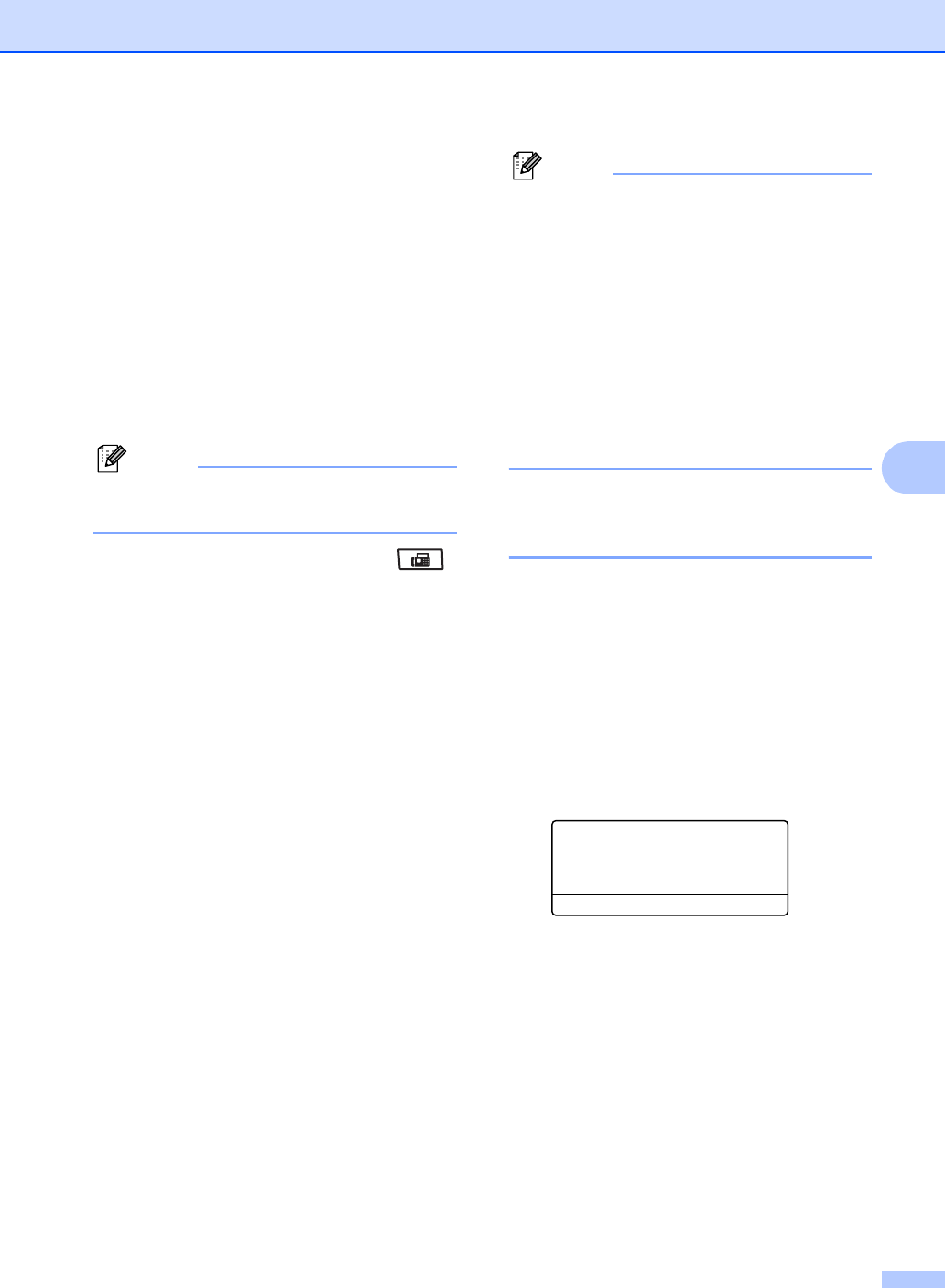
a Press Menu, 2, 7.
The LCD will display the Broadcast job
number followed by the fax number
being dialed (for example,
#001 0123456789) and the broadcast
job number (for example,
Broadcast#001).
27.Remaining Jobs
a #001 0123456789
b Broadcast#001
Select ab or OK
b Press a or b to choose the job number
you want to cancel.
Press OK.
c Press 1 to clear the job number or 2 to
exit.
If you chose to only cancel the fax
currently being sent in step b, the
machine will ask you if you want to
cancel the broadcast. Press 1 to clear
the whole broadcast job or 2 to exit.
d Press Stop/Exit.