
User Guide


Table Of Contents
- USER’S GUIDE MFC-8480DN/MFC-8680DN/MFC-8690DW/MFC-8890DW
- Brother numbers
- Ordering accessories and supplies
- Notice - Disclaimer of Warranties (USA and Canada)
- Compilation and Publication Notice
- Brother™ One-Year Limited Warranty and Replacement Service (USA Only)
- BROTHER MULTIFUNCTION CENTER / FAX MACHINELIMITED WARRANTY (Canada only)
- Table of Contents
- Section I: General
- 1 General information
- Using the documentation
- Accessing the Software User’s Guide and Network User’s Guide
- Viewing documentation
- Viewing documentation (Windows®)
- How to find scanning instructions
- Software User’s Guide:
- ScanSoft™ PaperPort™ 11SE with OCR How-to-Guides:
- How to find Network setup instructions (MFC-8690DW and MFC-8890DW)
- Viewing documentation (Macintosh)
- How to find scanning instructions
- Software User’s Guide:
- Presto! PageManager User’s Guide:
- How to find Network setup instructions (MFC-8690DW and MFC-8890DW)
- Viewing documentation
- Accessing Brother support (Windows®)
- Control panel overview
- 2 Loading paper and documents
- 3 General Setup
- 4 Security features
- 1 General information
- Section II: Fax
- 5 Sending a fax
- How to fax
- Broadcasting
- Additional sending operations
- 6 Receiving a fax
- 7 Telephone services and external devices
- 8 Dialing and storing numbers
- 9 Remote Fax Options
- 10 Polling
- 11 Printing reports
- 5 Sending a fax
- Section III: Copy
- Section IV:Direct printing
- Section V:Software
- Section VI: Appendixes
- A Safety and legal
- B Options
- C Troubleshooting and routine maintenance
- D Menu and features
- E Specifications
- F Glossary
- Index
- brother USA/CAN
Chapter 2
20
Loading documents 2
Using the automatic
document feeder (ADF) 2
The ADF can hold up to 50 pages and feeds
each sheet individually. Use standard 20 lb
(80 g/m
2
) paper and always fan the pages
before putting them in the ADF.
Recommended environment 2
IMPORTANT
• DO NOT leave thick documents on the
scanner glass. If you do this, the ADF may
jam.
• DO NOT use paper that is curled,
wrinkled, folded, ripped, stapled, paper-
clipped, pasted or taped.
• DO NOT use cardboard, newspaper or
fabric.
• To avoid damaging your machine while
using the ADF, DO NOT pull on the
document while it is feeding.
Note
To scan non-standard documents see
Using the scanner glass on page 21.
Make sure documents written with ink are
completely dry.
Documents to be faxed must be from 5.8
to 8.5 in. (148 to 215.9 mm) wide and from
5.8 to 14 in. (148 to 355.6 mm) long, and
of a standard weight [20 lb (80 g/m
2
)].
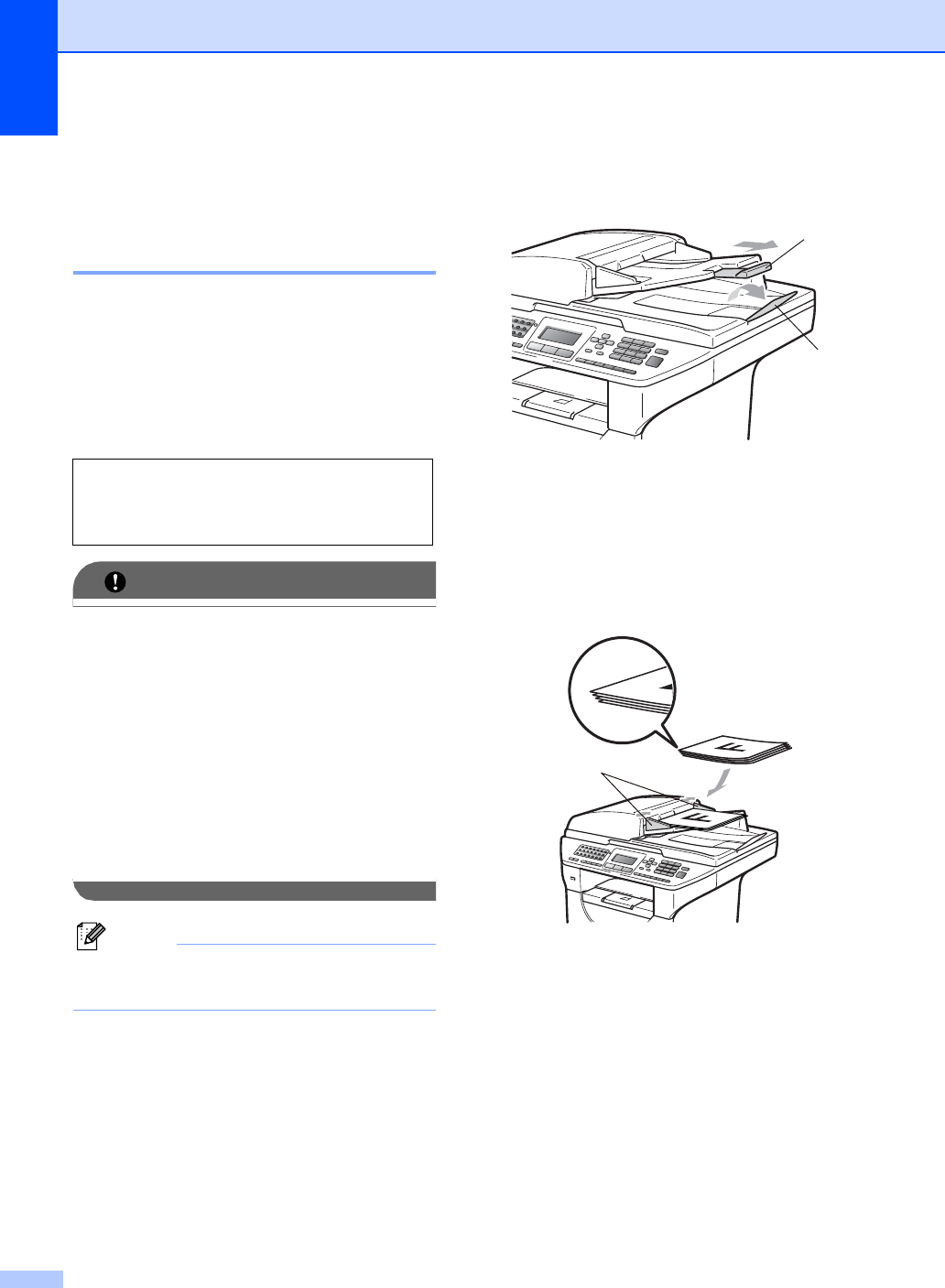
a Unfold the ADF document output
support flap (1) and the ADF support
flap (2).
b Fan the pages well.
c Place your document face up, top edge
first in the ADF until you feel it touch the
feed roller.
d Adjust the paper guides (1) to fit the
width of your document.
Temperature: 68° F to 86° F (20 to 30° C)
Humidity: 50% - 70%
Paper: Xerox 4200 (20 lb/Letter)
1
2
1