
User Guide



Table Of Contents
- USER’S GUIDE MFC-8480DN/MFC-8680DN/MFC-8690DW/MFC-8890DW
- Brother numbers
- Ordering accessories and supplies
- Notice - Disclaimer of Warranties (USA and Canada)
- Compilation and Publication Notice
- Brother™ One-Year Limited Warranty and Replacement Service (USA Only)
- BROTHER MULTIFUNCTION CENTER / FAX MACHINELIMITED WARRANTY (Canada only)
- Table of Contents
- Section I: General
- 1 General information
- Using the documentation
- Accessing the Software User’s Guide and Network User’s Guide
- Viewing documentation
- Viewing documentation (Windows®)
- How to find scanning instructions
- Software User’s Guide:
- ScanSoft™ PaperPort™ 11SE with OCR How-to-Guides:
- How to find Network setup instructions (MFC-8690DW and MFC-8890DW)
- Viewing documentation (Macintosh)
- How to find scanning instructions
- Software User’s Guide:
- Presto! PageManager User’s Guide:
- How to find Network setup instructions (MFC-8690DW and MFC-8890DW)
- Viewing documentation
- Accessing Brother support (Windows®)
- Control panel overview
- 2 Loading paper and documents
- 3 General Setup
- 4 Security features
- 1 General information
- Section II: Fax
- 5 Sending a fax
- How to fax
- Broadcasting
- Additional sending operations
- 6 Receiving a fax
- 7 Telephone services and external devices
- 8 Dialing and storing numbers
- 9 Remote Fax Options
- 10 Polling
- 11 Printing reports
- 5 Sending a fax
- Section III: Copy
- Section IV:Direct printing
- Section V:Software
- Section VI: Appendixes
- A Safety and legal
- B Options
- C Troubleshooting and routine maintenance
- D Menu and features
- E Specifications
- F Glossary
- Index
- brother USA/CAN
172
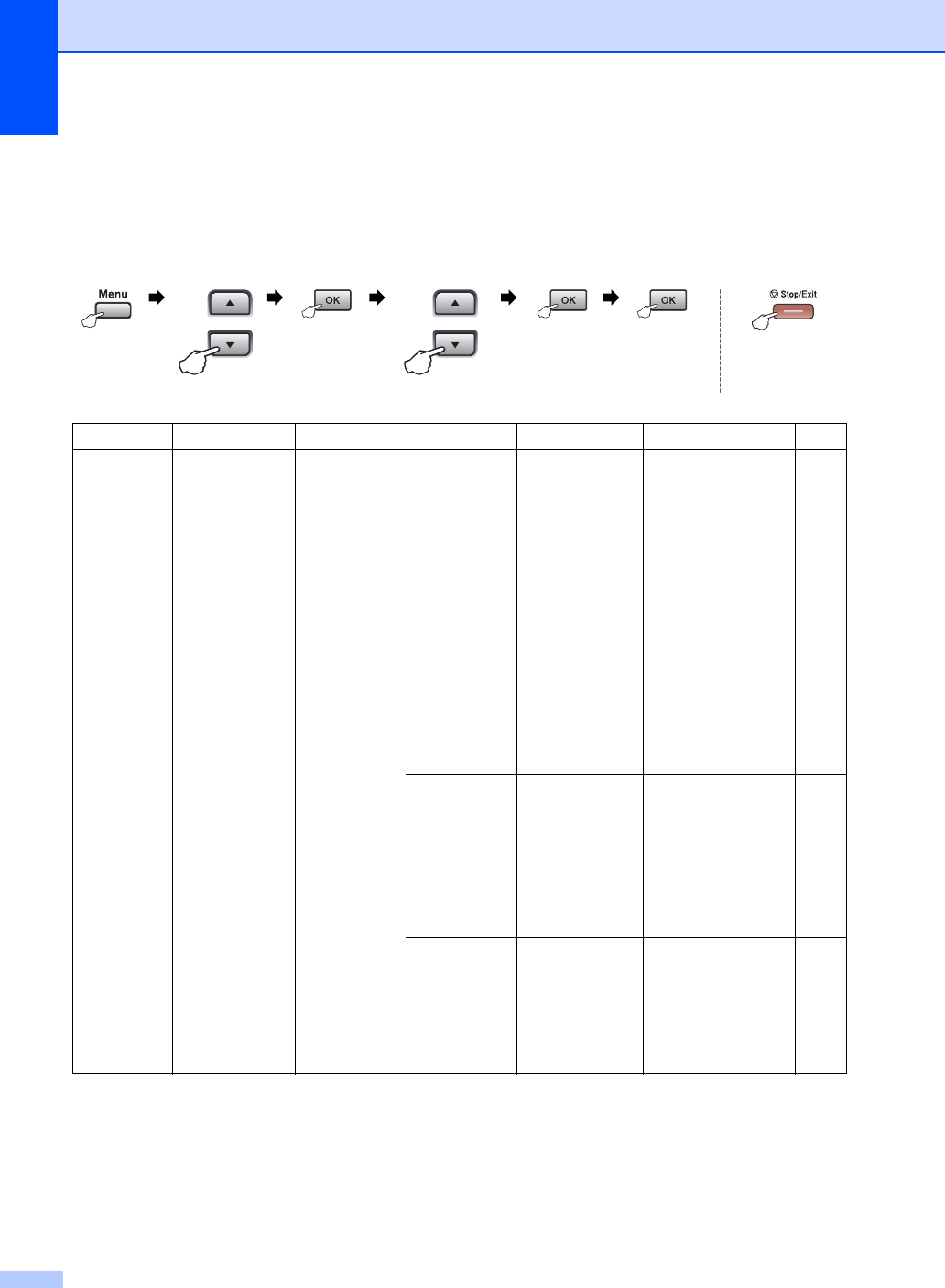
Menu table D
The factory settings are shown in Bold with an asterisk.
Choose & OK Choose & OK to accept to exit
Main Menu Submenu Menu Selections Options Descriptions Page
1.General Setup
1.Mode Timer ——0 Sec
30 Secs
1 Min
2 Mins*
5 Mins
Off
Sets the time to
return to Fax mode
and the time the
machine will change
from individual user
to Public mode when
using Secure
Function Lock.
22
33
2.Paper
1.Paper Type
1.MP Tray Thin
Plain*
Thick
Thicker
Transparency
Recycled Paper
Sets the type of
paper in the MP tray.
22
2.Tray#1 Thin
Plain*
Thick
Thicker
Transparency
Recycled Paper
Sets the type of
paper in the paper
tray.
22
3.Tray#2
(This menu
only appears if
you have the
optional
tray #2.)
Thin
Plain*
Thick
Thicker
Recycled Paper
Sets the type of
paper in the optional
paper tray #2.
22