
User Guide


Table Of Contents
- USER’S GUIDE MFC-8480DN/MFC-8680DN/MFC-8690DW/MFC-8890DW
- Brother numbers
- Ordering accessories and supplies
- Notice - Disclaimer of Warranties (USA and Canada)
- Compilation and Publication Notice
- Brother™ One-Year Limited Warranty and Replacement Service (USA Only)
- BROTHER MULTIFUNCTION CENTER / FAX MACHINELIMITED WARRANTY (Canada only)
- Table of Contents
- Section I: General
- 1 General information
- Using the documentation
- Accessing the Software User’s Guide and Network User’s Guide
- Viewing documentation
- Viewing documentation (Windows®)
- How to find scanning instructions
- Software User’s Guide:
- ScanSoft™ PaperPort™ 11SE with OCR How-to-Guides:
- How to find Network setup instructions (MFC-8690DW and MFC-8890DW)
- Viewing documentation (Macintosh)
- How to find scanning instructions
- Software User’s Guide:
- Presto! PageManager User’s Guide:
- How to find Network setup instructions (MFC-8690DW and MFC-8890DW)
- Viewing documentation
- Accessing Brother support (Windows®)
- Control panel overview
- 2 Loading paper and documents
- 3 General Setup
- 4 Security features
- 1 General information
- Section II: Fax
- 5 Sending a fax
- How to fax
- Broadcasting
- Additional sending operations
- 6 Receiving a fax
- 7 Telephone services and external devices
- 8 Dialing and storing numbers
- 9 Remote Fax Options
- 10 Polling
- 11 Printing reports
- 5 Sending a fax
- Section III: Copy
- Section IV:Direct printing
- Section V:Software
- Section VI: Appendixes
- A Safety and legal
- B Options
- C Troubleshooting and routine maintenance
- D Menu and features
- E Specifications
- F Glossary
- Index
- brother USA/CAN
Troubleshooting and routine maintenance
155
C
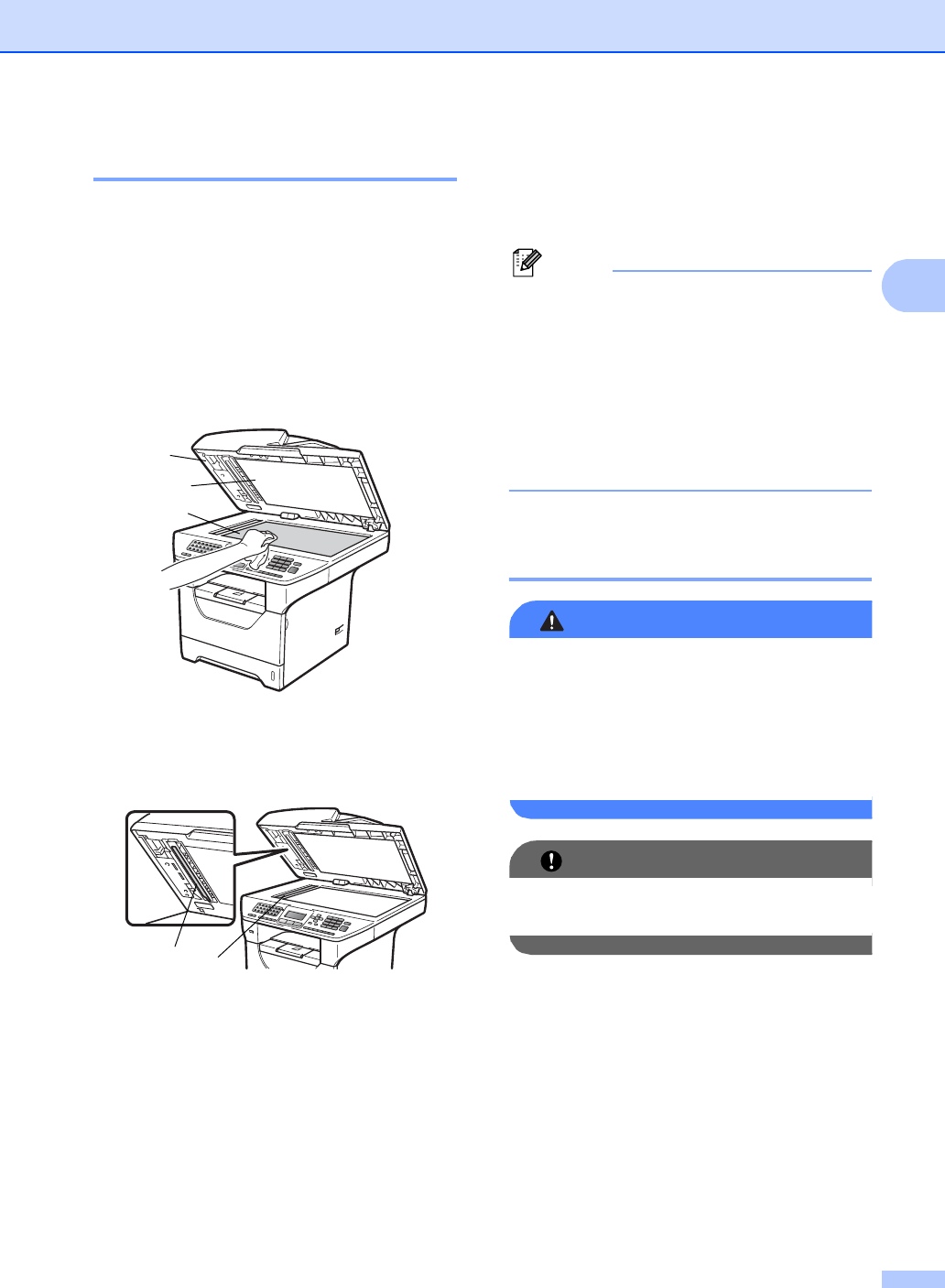
Cleaning the scanner C
a Turn off the machine’s power switch.
Unplug the telephone line cord first,
disconnect all cables and then unplug
the power cord from the AC power
outlet.
b Lift the document cover (1).
Clean the white plastic surface (2) and
scanner glass (3) underneath it with a
soft lint-free cloth moistened with water.
c In the ADF unit, clean the white bar (1)
and the scanner glass strip (2)
underneath it with a soft lint-free cloth
moistened with water.
d Plug the machine’s power cord back into
the AC power outlet first, and reconnect
all cables and telephone line cord. Turn
on the machine’s power switch.
Note
In addition to cleaning the scanner glass
and glass strip with a soft lint-free cloth
moistened with water, run your finger tip
over the glass to see if you can feel
anything on it. If you feel dirt or debris,
clean the glass again concentrating on
that area. You may need to repeat the
cleaning process three or four times. To
test, make a copy after each cleaning.
Cleaning the laser scanner
window C
WARNING
DO NOT use cleaning materials that
contain ammonia, alcohol, any type of
spray, or any type of flammable substance
to clean the inside or outside of the
machine. Doing this may cause a fire or
electrical shock.
IMPORTANT
DO NOT touch the laser scanner window
with your fingers.
a Before you clean the inside of the
machine, turn off the machine’s power
switch. Unplug the telephone line cord
first, and then unplug the power cord
from the AC power outlet.
1
3
2
1
2